Intraday Refuges/Shelters (RID)==========================================
RID (INTRADAY SHELTERS/REFUGES) INDICATOR
==========================================
*Fair warning: this may be more words than a humble, simple indicator truly
needs… but Claude insisted.
// ** INTRODUCTION ** //
RID (Intraday Shelters/Refuges) is a lightweight, fast, and easy-to-implement
indicator designed for monitoring price action on intraday timeframes — the same
ones used by institutional operators to execute their trades within each market session.
The indicator generates a framework of support and resistance levels automatically
calculated from the asset's Daily Opening Price (D.O.P.). These levels are established
using fixed percentages that have proven their effectiveness in institutional trading
for decades, constituting "textbook" references widely adopted by market professionals.
RID integrates as an optional module within our Weekly Shelters (RS) indicator, allowing
the operator to simultaneously control their weekly positions and, when conditions warrant,
move down to intraday operations without loading additional indicators or losing sight
of the higher timeframe.
// ** INDICATOR FUNDAMENTALS ** //
The foundation of RID rests on a proven market principle: the daily opening price acts
as a "psychological anchor" that influences participant behavior throughout the entire session.
Why does this method work?
• UNIVERSAL REFERENCE POINT: The daily opening price is objective data, visible to all
market participants simultaneously. Institutions, algorithms, and retail traders use it
as a common reference to calibrate their decisions.
• STANDARD PERCENTAGE LEVELS: The percentages used (0.382%, 1.0%, 1.5%, 2.0%, 2.5% and
extensions) are not arbitrary. They represent intraday volatility thresholds that have
historically acted as inflection points across multiple asset classes.
• SELF-FULFILLING PROPHECY EFFECT: When a critical mass of operators place orders at the
same percentage levels —whether for profit-taking, protective stops, or entries—
these levels become high-probability price reaction zones.
• INSTITUTIONAL RISK MANAGEMENT: Institutional trading desks frequently define their daily
loss limits and profit targets in percentage terms relative to the open. RID captures
this logic and makes it visible for retail operators.
The ±0.382% level deserves special mention: it's a derivation of the Fibonacci golden ratio
(0.382) applied to the intraday context, representing the first significant movement threshold
from the opening.
// ** INDICATOR OBJECTIVES ** //
1) Facilitate manual intraday trade execution by providing a framework of target prices
established under a scheme of mathematical certainty, eliminating subjectivity in
defining entries, exits, and stops.
2) Serve as a lightweight and modular tool, easily integrable —either as an overlay or
source code— with strategies and indicators specialized in intraday trade execution,
both manual and automated.
3) Provide a visual reference framework that allows the operator to quickly assess the
intraday market "temperature": Is price near a key support or resistance? Has it already
reached the session's typical movement target? Is it time to seek entries or protect profits?
// ** INDICATOR TECHNICAL FEATURES ** //
• 21 CONFIGURABLE LEVELS: 11 main levels (±0.382%, ±1.0%, ±1.5%, ±2.0%, ±2.5% and D.O.P.)
plus 10 extended levels (±3.0% to ±5.0%) for high volatility sessions. Each level can
be individually enabled or disabled according to operator needs.
• AUTOMATIC D.O.P. DETECTION: The indicator automatically identifies the start of each daily
session and captures the opening price without user intervention.
• CONFIGURABLE HISTORY LIMIT: Option to limit processing to the last N days (default: 3),
optimizing performance on very low timeframes (1m, 5m) where excess historical data can
slow down the chart.
• PROFESSIONAL VISUALIZATION: Labels with formatted price (thousands separators) and
percentage, placeable with configurable offset. The D.O.P. level (0%) is highlighted
with differentiated width.
• VERTICAL REFERENCE LINES: From D.O.P. to each level, facilitating visualization of the
percentage distance traveled.
• FULL CUSTOMIZATION: Colors, widths, line styles (solid, dashed, dotted), label opacity,
and forward extension fully adjustable.
• PRICE SCALE INTEGRATION: Levels can be displayed on the right margin of TradingView,
controllable from the indicator's Style tab.
• BAR REPLAY COMPATIBILITY: Works perfectly with Bar Replay for back-testing
intraday strategies.
• OPTIMIZED PERFORMANCE: Efficient architecture with persistent arrays and intelligent
updating, suitable for timeframes down to 1 minute.
// ** OPERATING INSTRUCTIONS ** //
INITIAL SETUP:
1) Load the indicator on a chart with 4H or lower timeframe (1H, 30m, 15m, 5m, 1m).
2) Enable "Limit history by days" and adjust "Maximum days to display" according to your needs:
• For scalping (1m-5m): 1-2 days
• For day trading (15m-1H): 2-3 days
• For intraday swing (4H): 3-5 days
OPERATIONAL USE:
3) Identify the D.O.P. (0% line): This is your central reference point for the session.
4) Observe current price position relative to levels:
• Price above D.O.P. → Session with bullish bias
• Price below D.O.P. → Session with bearish bias
5) Use levels as:
• ENTRIES: Look for reversal signals when price reaches S1-S5 (buys) or R1-R5 (sells)
• TARGETS: Set take-profits at the next resistance level (longs) or support (shorts)
• STOPS: Place protective stops beyond the immediate opposite level
PRACTICAL RULES:
6) The ±1.0% and ±2.0% levels are historically most respected; prioritize them.
7) If price exceeds ±2.5% from open, it might be time to take profits and close your position
or consider enabling extended levels (±3.0% to ±5.0%).
8) High volatility days (news, earnings): wait for price to respect at least one level
before trading in its direction.
9) Combine RID with other indicators from our ecosystem (RS, RMP, RLP/RLPS) to confirm level
confluence across multiple timeframes.
VISUAL OPTIMIZATION:
10) For clean charts: keep enabled only main levels (±0.382% to ±2.5%).
11) For detailed volatile asset analysis: also enable extended levels.
12) Adjust "Label margin" to prevent overlap with current price.
// ** INTEGRATION WITH OTHER SHELTER VALUE INDICATORS ** //
RID is part of a complete shelter-based analysis ecosystem we have developed:
• RLP (Long-Term Shelters): For automatic determination of the preponderant phase
of a Zigzag, which institutional investors choose as the base of a Fibo whose
levels calculate order placement projection over the following months and years.
• RLPS (Simplified Long-Term Shelters): Simplified version of RLP where known
coordinates of the preponderant phase are captured, obtained through own analysis
or automatically with the RLP indicator.
• RMP (Medium-Term Shelters): Provides psychological shelter and resistance levels
that institutional investors establish at the beginning of each year. They
constitute the main framework used by professionals to plan operations
throughout the year.
• RS (Weekly Shelters): For short-term tactical analysis (4H, 1H) based on selected
phases of one or two Zigzags that define Fibo tracing, over recent major and minor
degree pauses, whose levels take effect during the current and following weeks.
• RID (Intraday Shelters): This indicator. For intraday operations based on levels
calculated from daily opening price, designed for 4H or lower timeframes,
including scalping strategies.
By combining RID with RLP/RLPS, RMP and RS, a multilevel scaffolding is built that
allows trading with clarity on any time horizon, from minute positions to operations
projected over months and years.
// ** NOTES ** //
• All comments regarding detected errors and improvement suggestions are welcome and deeply appreciated. Your feedback helps us refine these tools.
• To our Hispanic speaking friends, we sincerely regret to inform you that we have not
included the Spanish translation in the published version, due to our latent concern
regarding the ambiguous rules about prohibitions on publishing indicators documented
or described in languages other than English.
• Sharing is motivating because there’s no better way to receive genuine feedback
of real acceptance.
• RECOMMENDED VALIDATION METHOD: Use TradingView's Bar Replay to verify, session by
session, how price of your favorite asset interacts with RID levels. This personal
validation will give you statistical confidence before incorporating the indicator
into your actual trading.
Happy hunting in this magnificent jungle!
Intra

Session Opening Range Breakout (ORBO)This strategy automates a classic Opening Range Breakout (ORBO) approach: it builds a price range for the first minutes after the market opens, then looks for strong breakouts above or below that range to catch early directional moves.
Concept
The idea behind ORBO is simple:
The first minutes after the session open are often highly informative.
Price forms an “opening range” that acts as a mini support/resistance zone.
A clean breakout beyond this zone can lead to high-momentum moves.
This script turns that logic into a fully backtestable strategy in TradingView.
How the strategy works
Opening Range Session
Default session: 09:30–09:50 (exchange time)
During this window, the script tracks:
orHigh → highest high within the session
orLow → lowest low within the session
This forms your Opening Range for the day.
Breakout Logic (after the window ends)
Once the defined session ends:
Long Entry:
If the close crosses above the Opening Range High (orHigh),
→ strategy.entry("OR Long", strategy.long) is triggered.
Short Entry:
If the close crosses below the Opening Range Low (orLow),
→ strategy.entry("OR Short", strategy.short) is triggered.
Only one opening range per day is considered, which keeps the logic clean and easy to interpret.
Daily Reset
At the start of a new trading day, the script resets:
orHigh := na
orLow := na
A fresh Opening Range is then built using the next session’s 09:30–09:50 candles.
This ensures entries are always based on today’s structure, not yesterday’s.
Visuals & Inputs
Inputs:
Opening range session → default: "0930-0950"
Show OR levels → toggle visibility of OR High / Low lines
Fill range body → optional shaded zone between OR High and OR Low
Chart visuals:
A green line marks the Opening Range High.
A red line marks the Opening Range Low.
Optional yellow fill highlights the entire OR zone.
Background shading during the session shows when the range is currently being built.
These visuals make it easy to see:
Where the OR sits relative to current price
How clean / noisy the breakout was
How often price respects or rejects the opening zone
Backtesting & Optimization
Because this is written as a strategy():
You can use TradingView’s Strategy Tester to view:
Win rate
Net profit
Drawdown
Profit factor
Equity curve
Ideas to experiment with:
Change the session window (e.g., 09:15–09:45, 10:00–10:30)
Apply to different:
Markets: indices, FX, crypto, stocks
Timeframes: 1m / 5m / 15m
Add your own:
Stop Loss & Take Profit levels
Time filters (only trade certain days / times)
Volatility filters (e.g., ATR, range size thresholds)
Higher-timeframe trend filter (e.g., only take longs above 200 EMA)

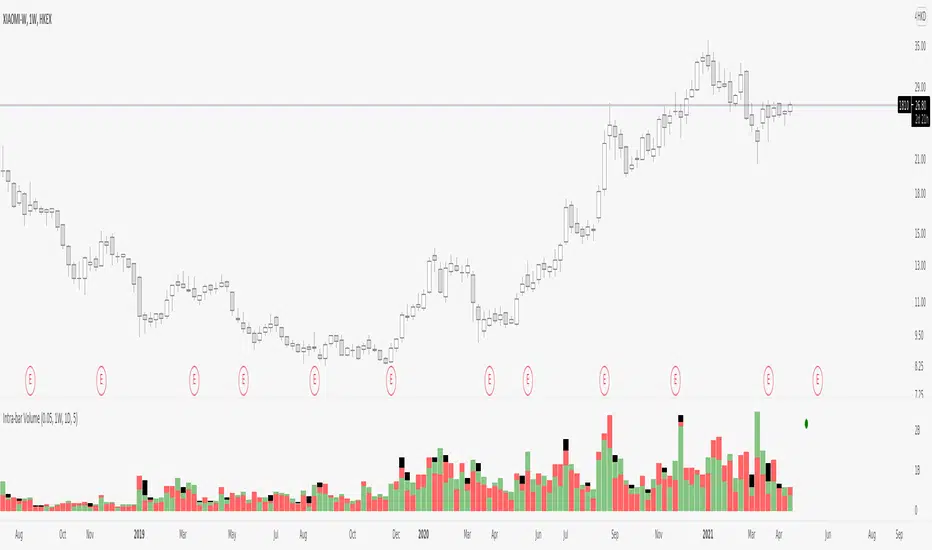
Intra-bar VolumeDisclamer : READ THIS BEFORE USING IT !!!
I have take and try to improuve the source code of indicator "intra-bar volume" by backtest-rookies.com
This indicator categorized the volume in lower timeframe, if the candle close up it's a buying volume, if it close down...
Beware that is not easy to work with different TF on tradingview so you have some limitation on the TF with this indicator. Also in TV we can't have a mutable variable in a security fonction.. so my approche is not clean but it works, if someone find better way, please comment or contact me :)
So by default the indicator can work on the following TF : 5m 15m 30m 60m 120m 240m 480m 720m 1D 1W 12M.
But ... this indicator need a lower timeframe and the number of bar to work correctly, in my code i suppose that the market run 24/7, so you need to adapte it or use intraday TF for other market.
To make sure that the indicator work correctly i have juste add circle, if it's green the buying+selling+balance volume is equal to the volume on the last close candle. If it's red theire is a problem.
I hope you enjoy it, feel free to modify the code and comment if you have any sugestion, i have just make it so maybe i will ajust some part of the code.