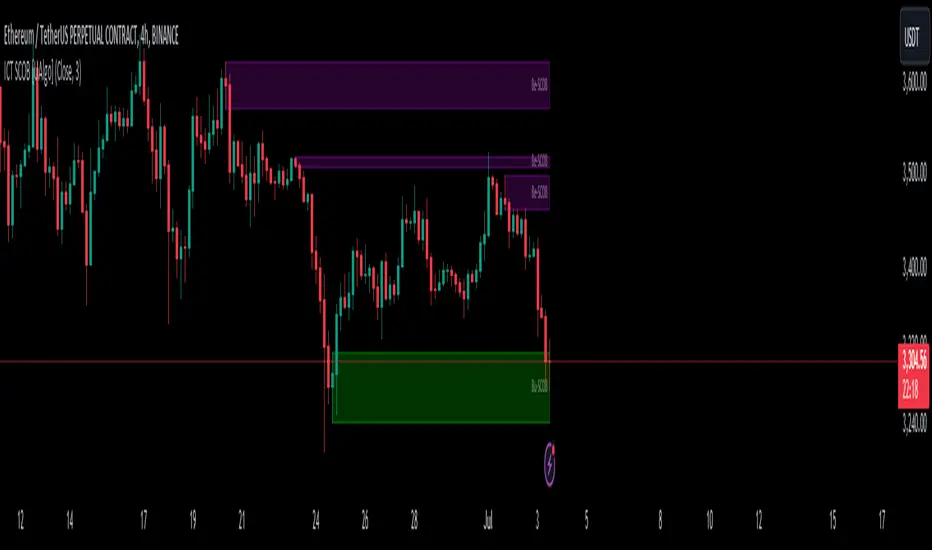
Single Candle Order Block (ICT) [Kodexius]Single Candle Order Block (ICT) is a chart-focused implementation of the ICT style Single Candle Order Block (SCOB) concept. It detects a strict 3 candle displacement pattern and projects the originating “order block candle” as a live zone that extends forward in time until price mitigates it.
The script is designed for practical trading workflows:
- It plots only the most recent active zones (user-defined limit) to keep charts readable.
- It supports optional multi-timeframe (MTF) detection, so you can project higher-timeframe SCOBs onto a lower-timeframe execution chart.
- It includes a mitigation engine (Close or Wick) to automatically invalidate and remove zones once they are decisively broken.
🔹 Features
🔸 ICT Single Candle Order Block Pattern Detection (Bull and Bear)
The indicator identifies a clean displacement sequence that implies a potential order block formed by the middle candle of a 3-candle structure.
Bullish SCOB: bearish candle at , bullish continuation at , then bullish displacement that closes above the prior candle’s high, with a sweep condition on the order block candle’s low.
Bearish SCOB: inverse structure requiring bearish displacement that closes below the prior candle’s low, with a sweep condition on the order block candle’s high.
The plotted zone boundaries are derived from the order block candle:
Top = high
Bottom = low
🔸 Multi-Timeframe Detection (Optional)
The script can compute SCOBs on a selected timeframe and display them on the current chart using request.security. This is ideal for mapping higher-timeframe order blocks onto lower-timeframe execution charts.
If the timeframe input is left empty, detection runs on the chart timeframe.
🔸 Volatility Filter (Optional)
When enabled, detections are filtered by volatility regime:
A SCOB is only displayed if ATR(14) > SMA(ATR(14), 200)
This helps reduce signals during compressed, low-range conditions where displacement patterns are often less meaningful.
🔸 Overlap Control (De-Cluttering)
Before a new zone is added, the script checks for overlap against existing zones of the same direction. If the new zone intersects an existing one, it is ignored. This reduces redundant stacking of zones in the same price area.
🔸 Mean Threshold (50%) Midline (Optional)
Each active SCOB is drawn as a semi-transparent box with:
Direction label text (Bu-SCOB / Be-SCOB)
Optional midpoint line at 50% of the zone height (Mean Threshold)
🔸 Automatic Zone Extension and Object Management
Zones extend forward on each bar to remain visible until mitigation. The script also manages object count and chart cleanliness by:
Keeping internal arrays for bull and bear zones
Removing older stored zones if internal history grows too large
Displaying only the most recent “Active SCOB Limit” zones while hiding older ones
🔸 Alerts
Alerts are provided for newly confirmed detections:
Bullish SCOB Detected
Bearish SCOB Detected
Duplicate prints are prevented by tracking the last detected zone time for each direction.
🔹 Calculations
1) Volatility Regime Check (ATR vs ATR SMA)
float myAtr = ta.atr(14)
float atrSma = ta.sma(myAtr, 200)
bool isVolatile = myAtr > atrSma
If the Volatility Filter is enabled, the script requires isVolatile to be true before creating a SCOB zone.
2) Bullish SCOB Detection Logic
bool isBull = open > close and close > open and close > open and low < low and close > high
Interpretation of the conditions:
open > close confirms the candle at is bearish.
close > open confirms the order block candle at is bullish.
close > open confirms current candle is bullish.
low < low indicates a relative sweep on the order block candle’s low.
close > high confirms displacement by closing above the order block candle’s high.
Zone bounds for a bullish SCOB come from candle :
[isBull, high , low , time , isBear, high , low , time , isVolatile]
3) Bearish SCOB Detection Logic
bool isBear = open < close and close < open and close < open and high > high and close < low
Interpretation of the conditions:
open < close confirms the candle at is bullish.
close < open confirms the order block candle at is bearish.
close < open confirms current candle is bearish.
high > high indicates a relative sweep on the order block candle’s high.
close < low confirms displacement by closing below the order block candle’s low.
Zone bounds for a bearish SCOB also come from candle :
[isBull, high , low , time , isBear, high , low , time , isVolatile]
4) Multi-Timeframe (MTF) Selection
The script runs the detection logic on the chosen timeframe and projects results onto the current chart:
=
request.security(syminfo.tickerid, i_tf, detectLogic())
It also prevents duplicate zone creation by checking the last processed detection time:
var int lastBullTime = 0
var int lastBearTime = 0
if mtf_isBull and mtf_bullTime != lastBullTime
lastBullTime := mtf_bullTime
if mtf_isBear and mtf_bearTime != lastBearTime
lastBearTime := mtf_bearTime
5) Overlap Validation
Before pushing a new zone, overlap is checked against existing zones:
if volPass and not bullArray.hasOverlap(mtf_bullTop, mtf_bullBot)
SCOB newScob = SCOB.new(top = mtf_bullTop, bottom = mtf_bullBot, barStart = mtf_bullTime, isBull = true)
bullArray.push(newScob)
if volPass and not bearArray.hasOverlap(mtf_bearTop, mtf_bearBot)
SCOB newScob = SCOB.new(top = mtf_bearTop, bottom = mtf_bearBot, barStart = mtf_bearTime, isBull = false)
bearArray.push(newScob)
6) Mitigation Logic (Close vs Wick)
Mitigation is evaluated every bar. Bullish zones mitigate below the bottom; bearish zones mitigate above the top:
method isMitigated(SCOB this, string style, float currentClose, float currentHigh, float currentLow) =>
bool mitigated = false
if this.isBull
float price = style == "Close" ? currentClose : currentLow
mitigated := (price < this.bottom)
else
float price = style == "Close" ? currentClose : currentHigh
mitigated := (price > this.top)
mitigated
Scob
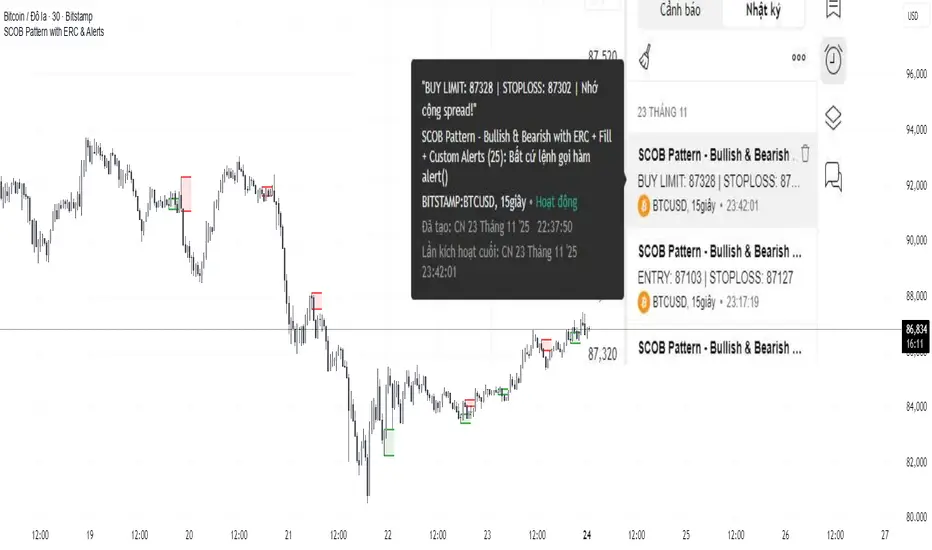
SCOB Pattern with ERC & AlertsSingle Candle Block (SC0B) consists of a single candle appearing at a significant price level, indicating a confirmed reversal in price direction from that particular area of interest.
SCOB is primarily used to confirm and execute trades.
Using a single candle block to enter a trade minimizes risk and maximizes reward.
Single bullish candle block?
1st candle closes at bullish point of interest with a short or long wick.
2nd candle sweeps the low of previous(1st) candle and closes above the low of previous candle.
3rd candle closes above the high of 2nd candle.
How to trade with Scob bullish.
To Trade using Bullish SCOB you have to wait for price to come down and test the single candle order block.
When price tests the SCOB you can directly execute a buy trade or for a precise entry you can wait for a market structure shift in lower time frame.
Scob discount is the opposite of price increase.
This strategy should only be used when price "sweeps through key lever, liquidity, imbalance, poi htf areas.
This indicator will add a filter to help you reduce signal noise.
Use the "Use engulfing candle to test" function to filter the 3rd candle.
Only search for Scob if the 3rd candle is an Engulfing candle.
The logic for finding Engulfing candles can be changed based on the "% maximum wick length" option. The default is that the candle wick is 25% of the total candle wick length.
You can also use the alert function when Scob appears
With Smart money concept, no strategy is perfect in trading, so you should not risk too much of your capital on this strategy.
To be safer, always remember to use stop loss for every trade.
ICT Single Candle Order Block (SCOB) [UAlgo]The "ICT Single Candle Order Block (SCOB) " designed for traders who utilize the concept of Order Blocks in their trading strategy. Order Blocks are significant price levels where institutions or smart money have placed their trades, leading to potential future price reactions when these levels are revisited. This indicator focuses on identifying and highlighting Single Candle Order Blocks (SCOBs), allowing traders to visually analyze key price levels on their charts.
🔶 What is Single Candle Order Block (SCOB) ?
A Single Candle Order Block (SCOB) is a specific type of Order Block that is identified based on a single candlestick pattern. These patterns indicate potential areas where significant buying or selling interest has occurred, often leading to a notable price reaction when revisited. In the context of this indicator, a bullish SCOB is identified when a specific bullish candlestick pattern is met, and a bearish SCOB is identified based on a bearish candlestick pattern.
Bullish SCOB: Detected when the open price of two bars ago is higher than its close, the close price of the previous bar is higher than its open, the current close price is higher than the open, the low of the previous bar is lower than the low of two bars ago, and the current close is higher than the high of the previous bar.
Bearish SCOB: Detected when the open price of two bars ago is lower than its close, the close price of the previous bar is lower than its open, the current close price is lower than the open, the high of the previous bar is higher than the high of two bars ago, and the current close is lower than the low of the previous bar.
🔶 Key Features
Show Single Candle Order Block (SCOB): Toggle the visibility of the Single Candle Order Blocks on the chart.
Mitigation Method: Choose between "Close" and "Wick" methods for determining whether a SCOB has been mitigated (price has interacted with the block).
Show Last X SCOBs: Control the number of most recent SCOBs displayed on the chart, allowing you to focus on the most relevant price levels.
Volatility Filter: Enable or disable the volatility filter, which uses the Average True Range (ATR) to filter out less significant SCOBs. When enabled, only SCOBs with an ATR above the mean value of the ATR are displayed.
Customizable Colors: Configure the colors for bullish and bearish SCOBs to enhance visual clarity. The indicator uses cooler RGB values to ensure the blocks are distinct and easily noticeable.
🔶 Disclaimer
The "ICT Single Candle Order Block (SCOB) " indicator is provided for educational and informational purposes only. Trading involves significant risk and may not be suitable for all investors.
Past performance is not indicative of future results. Users should use this indicator in conjunction with their own research and trading strategy.