Elder impulse system with double exponential moving average dema
This version of impulse uses the double exponential moving average instead of the typical ema both to calculate macd and the moving slow and fast moving average that are plotted.
The impulse system :
The Impulse System combines two simple but powerful indicators.
One measures market inertia, the other its momentum. When both
point in the same direction, they identify an impulse worth following.
We get an entry signal when both indicators get in gear.
The Impulse System uses an exponential moving average to find
uptrends and downtrends. When the EMA rises, it shows that inertia
favors the bulls. When EMA falls, inertia works for the bears. The sec-
ond component is MACD-Histogram, an oscillator whose slope reflects
changes of power among bulls or bears. When MACD-Histogram rises,
it shows that bulls are becoming stronger. When it falls, it shows that
bears are growing stronger.
The Impulse System flags those bars where both the inertia and the
momentum point in the same direction. When both the EMA and
MACD-Histogram rise, they show that bulls are roaring and the uptrend
is accelerating.
ابحث في النصوص البرمجية عن "BULL"
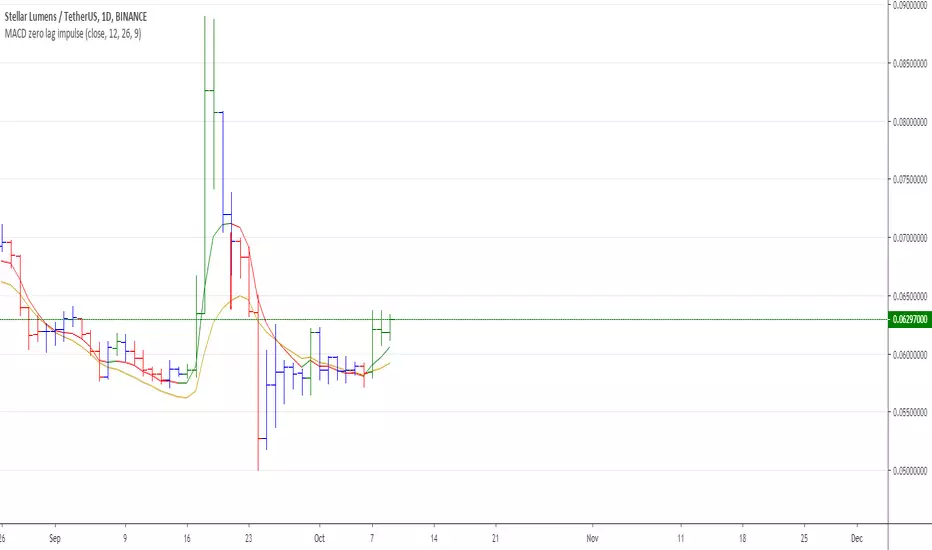
MACD Zero lag impulse systemThis version of impulse uses the double exponential moving average instead of the typical ema.
The impulse system :
The Impulse System combines two simple but powerful indicators.
One measures market inertia, the other its momentum. When both
point in the same direction, they identify an impulse worth following.
We get an entry signal when both indicators get in gear.
The Impulse System uses an exponential moving average to find
uptrends and downtrends. When the EMA rises, it shows that inertia
favors the bulls. When EMA falls, inertia works for the bears. The sec-
ond component is MACD-Histogram, an oscillator whose slope reflects
changes of power among bulls or bears. When MACD-Histogram rises,
it shows that bulls are becoming stronger. When it falls, it shows that
bears are growing stronger.
The Impulse System flags those bars where both the inertia and the
momentum point in the same direction. When both the EMA and
MACD-Histogram rise, they show that bulls are roaring and the uptrend
is accelerating.

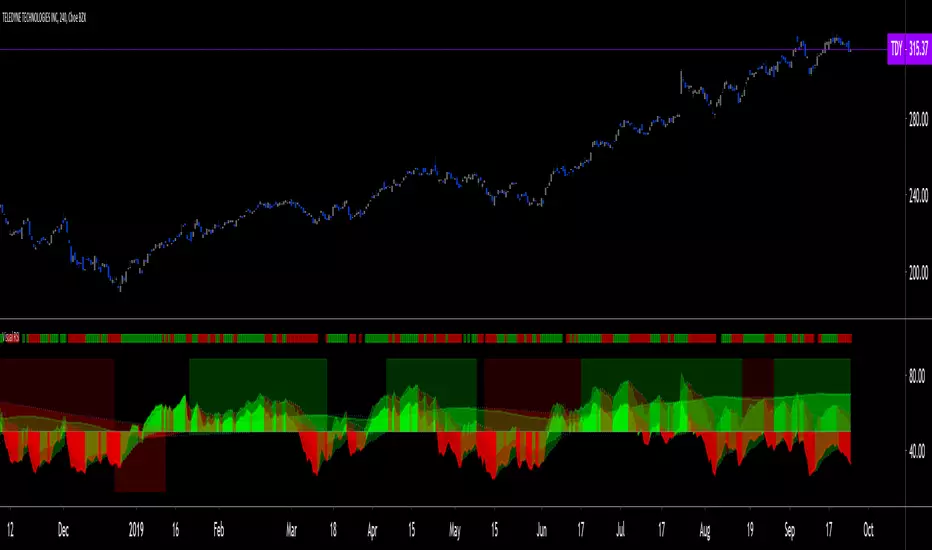
Visual RSI [LucF]Visual RSI offers a different way of looking at RSI by providing a composite representation of 9 different RSI-generated components. Instead of focusing on one line only, this approach blends multiple sources to provide the viewer with a larger context RSI-based picture.
For those who don’t want to read
• Green in bullish (>50) zone is the most bullish.
• Red in bullish zone doesn’t necessarily mean bearish—it just means bullish strength is weakening. It may be just a pause before a reprise or exhaustion signalling a reversal—impossible to tell.
• The same in inverse applies to the bearish zone (<50).
For those who want to understand
The nine components making up Visual RSI are:
• a current timeframe RSI
• a higher timeframe RSI
• the delta between these two RSI lines
• for each of these three basic components, two independent Bollinger band: one calculated for the bullish section of the scale (>50) and a separate one calculated for the lower bearish region.
Dual BBs
In my view, RSI’s position with regards to the centerline is much more important than its position in extreme areas. Why? Because the building block of RSI is the ratio of the averages of up/down moves during the RSI period. When the average of ups is greater, RSI is > 50. So while a rising signal starting from 20 let’s say, indicates that the rate of change is increasing, only when it crosses 50 can we say that sentiment balance has truly become bullish, and this information is more reliable than the signal being at a level corresponding to whatever estimate we make of what constitutes an extreme value. In my landscape, the general balance of a ratio provides more valuable information than the ratio’s exact value.
The idea behind the dual BBs is to provide independent tracking information for both halves of the indicator’s space, which I find more useful than the normal method of simply adding a multiple of the standard deviation on both sides of the mean. With dual BBs, the upper BB will never go lower than the indicator’s centerline, and the lower BB will never go higher. The upper BB focuses on upper-bound volatility when the signal is bearish, and the lower BB focuses on downside volatility when the signal is bearish.
The functions used to calculate the independent BBs are reusable on other signals if a centerline can be defined for them. A clamping percentage is implemented, so that when a BB line is hugging the centerline it clamps to it. This helps in providing earlier signals when they use the BB line states.
Providing context to RSI
What RSI measures indirectly is the balance in the rate of change—or the speed of price movement, but not its instant value, otherwise RSI would be even noisier. More precisely, RSI represents the relative strength of the up/down movement in the last n bars of RSI’s length, with 14 often used because that’s what Wilder proposed (Visual RSI’s defaults are 20 for the current timeframe and 40 for the higher timeframe). At every bar, a new value is added to the equation and an old value carrying equal weight is dropped, so a large dropped off value will have more impact on RSI’s value if the new bar’s move is small. This accounts for some of RSI’s speed in identifying exhaustion after important moves, but almost for some of its noise.
Visual RSI is the result of trying to drown RSI’s noise in the context of other informational streams, while simultaneously providing even faster information than RSI alone, by giving more visual weight to the delta between the current and higher timeframe RSI’s.
How to read Visual RSI
The default settings show all 9 basic components as green/red areas of intensities varying with their importance. The most intense colors are reserved for the delta RSI and the BBs have the lightest intensities. The individual lines of components are intentionally difficult to distinguish so that focus is first on the general picture, including the all-important six-state background, and then on the delta RSI.
One entry setup could be reversals in a larger trend context, so low pivots of the delta in a fully bullish context (a green background in the upper section of the indicator), and inversely, high pivots in a fully bearish context (a red background in the lower section of the indicator).
Please resist the common misconception, when interpreting RSI, that a reversal in the signal will necessarily lead to a reversal in price. Each trend has its rhythm. Only machine-generated price action can progress regularly. It’s normal for trends to take a breather for some time before they continue or reverse, as traders driving the trend experience emotional fatigue and gradual fear. RSI reversals merely signify that such a breather has occurred—nothing more. Only the larger context can provide information that can situate that pause and put more meaningful odds on it having more probability of continuing in one direction or the other. This is the reasoning behind the setup just described.
Features
• All components can be hidden, displayed as a simple line, a uniformly colored fill, or a green/red fill (the default).
• The background can be colored using 9 different methods, including 3 six-state methods using the rising/falling BB lines of the 3 basic components. These six states allow for bullish/bearish/neutral sentiment in both the upper and lower regions of the indicator. A bearish (dark red) background in the bullish (>50) section of the indicator represents decreasing bullishness. A bearish (slightly brighter red) in the bearish (<50) section of the indicator means incresingly bearish sentiment. The six-state backgrounds allow for neutral (no color) sentiment when no compelling signs can be found to conclude anything with meaningful odds. The default background uses the six-state method on the higher timeframe RSI’s BBs because I find it the most useful, as it represents the largest—and slowest—context sentiment among all the indicator’s components.
• A thin status bar in the top part of the indicator also allows selection of the same 9 methods to color it. The default is a triple-state system using the rising/falling characteristics of the current timeframe RSI’s BBs to provide a short-term counterbalance to the long-term background.
• Three different markers can be configured using approximately 70 permutations each, each filtered by 20 different filter permutations. When modification of the relevant parameters in the script’s Settings/Settings/Parameters section is added, possibilities are almost endless. If the generated signals are then fed into the PineCoders Engine and combined with the Engine’s own options, the permutations go up another order of magnitude, and changes to any setting can be instantly evaluated using the Engine’s backtesting results.
• Five simple filters can be combined. They are additive. They include volume-related conditions and a chandelier, which I find useful because both volume and volatility (the chandelier using highs/lows and ATR) are sensible complementary sources to RSI’s momentum information. The filter’s state can be shown as a thin line at the bottom of the indicator.
• Alerts can be configured using any of the marker/filter combinations mentioned. As usual, once your markers/filters are set up the way you want, create your alert from the chart/timeframe you want the alert to run on and be sure to use the “Once Per Bar Close” triggering condition. Use an alert message that will remind you of which combination of markers were used when creating the alert.
• A plot providing entry signals for the PineCoders Backtesting & Trading Engine is supplied. It will use whichever marker/filter configuration is active to generate signals.
• All higher timeframe information is non-repainting. Higher timeframe lines can be smoothed (the default). The selection of the higher timeframe can be made using 3 different methods:
1. By steps (if current timeframe <= 1 minute: 60 min, <= 60 min: 1D, <= 6H: 3D, <= 1D: 1W, <=1W: 1M, >1W: 12M)
2. By a user-defined multiple of the current timeframe
3. Using a fixed timeframe
Thanks to:
• Alex Orekhov aka @everget for the chandelier code.
• @RicardoSantos who through a small remark early on, unknowingly put me on the track of eliminating noise through visual crowding.
• The brilliant guys in the PineCoders Pro room for your knowledge, limitless creativity and constant companionship.
Elder impulse system with barcolor + Safezone stops + emasThe impulse system :
The Impulse System combines two simple but powerful indicators.
One measures market inertia, the other its momentum. When both
point in the same direction, they identify an impulse worth following.
We get an entry signal when both indicators get in gear.
The Impulse System uses an exponential moving average to find
uptrends and downtrends. When the EMA rises, it shows that inertia
favors the bulls. When EMA falls, inertia works for the bears. The sec-
ond component is MACD-Histogram, an oscillator whose slope reflects
changes of power among bulls or bears. When MACD-Histogram rises,
it shows that bulls are becoming stronger. When it falls, it shows that
bears are growing stronger.
The Impulse System flags those bars where both the inertia and the
momentum point in the same direction. When both the EMA and
MACD-Histogram rise, they show that bulls are roaring and the uptrend
is accelerating.
The SafeZone Stop :
Once in a trade, where should you put your stop? This is one of the
hardest questions in technical analysis. After answering it, you’ll face
an even harder one—when and where to move that stop with the pas-
sage of time. Put a stop too close and it’ll get whacked by some mean-
ingless intraday swing. Put it too far, and you’ll have very skimpy
protection.
The Parabolic System, described in Trading for a Living, tried to
tackle this problem by moving stops closer to the market each day,
accelerating whenever a stock or a commodity reached a new extreme.
The trouble with Parabolic was that it kept moving even if the market
stayed flat and often got hit by meaningless noise.
SafeZone trails prices with stops tight enough to protect
capital but remote enough to keep clear of most random fluctuations.
Engineers design filters to suppress noise and allow the signal to come
through. If the trend is the signal, then the countertrend motion is the
noise. When the trend is up, we can define noise as that part of each
day’s range that protrudes below the previous day’s low. When the trend
is down, we can define noise as that part of each day’s range that pro-
trudes above the previous day’s high. SafeZone measures market noise
and places stops at a multiple of noise level away from the market.
We can make our lookback period 100 days or so if we want to aver-
age long-term market behavior.
SafeZone offers an original approach to placing stops. It monitors
changes in prices and adapts stops to the current levels of activity. It
places stops at individually tailored distances rather than at obvious
support and resistance levels.

NG [Wave Period Oscillator]The WPO is a short-term oscillator that measures the buying and selling period of price cycles over a certain time interval.
The leading oscillator indicates a rise in buying period when it moves above the zero line and a rise in selling period when it moves below the zero line.
Trading Tactics
Center line Crossover: a bullish center line crossover occurs when the WPO line moves above the zero level to turn positive.
A bearish center line crossover occurs when the WPO line moves below the zero level to turn negative.
When bulls are in control, the price rally begins and the average of the bull’s period T increases to drive the WPO line above the center line.
A buy signal is subsequently triggered.
When the bulls start to loose power, prices move sideways and the average period decreases. In this case, the WPO line may fl utter near the center line and cause false signals, whipsaws.
To avoid the whipsaws occurring on the center line, the following trading tactics are proposed:
Uptrend Tactic:
During an ideal uptrend, the WPO does not reach the lower boundary -2 and usually rebounds from a higher level than -2.
This means that the bulls have taken control earlier. Hence, a zero line crossover generates a buy signal. The WPO crosses the upper boundary at +2 then pulls back again below +2 to generate a sell signal.
Sideways Tactic:
During sideways, the WPO fluctuates between the lower and upper boundaries -2 and 2. This tactic is also used in an uptrend where corrections are strong enough to drive the WPO line below the lower boundary.
Downtrend Tactic:
During downtrends, the WPO fails to reach the upper boundary and oscillates between the 0 and -2 levels. The bears enter early indicating an obvious weakness in the market. Therefore, crossing the zero level generates a sell signal.
Exit at Weakness:
During uptrend reversals and downtrends, the WPO oscillates between the center line and the lower boundary -2. The bears are controlling the market and move in wide cycle periods while the bull’s strength is almost absent.
An exit signal is triggered once the WPO crosses -2. When prices decline, the WPO may cross its extreme lower boundary at -2.7. Therefore, a swift exit signal is triggered once the WPO crosses -2.
Re-Entry:
During uptrend, the WPO crosses down the upper boundary level at +2 to generate a sell signal. Yet, it does not reach the zero line and the oscillator moves back toward the upper boundary.
This case is considered as strength while a re-entry signal occurs at the +2 level crossover. The sell signal is generated when the WPO line crosses down the upper boundary.

Ichimoku Kinko Hyo: Basic StrategyIchimoku Kinko Hyo: Basic Strategy
Entry/Exit orders are placed when three basic signals are triggered.
Ichimoku Signals:
1) Tenkan-Sen/Kijun-Sen Cross
Bullish: Tenkan-Sen is above the Kijun-Sen.
Bearish: Tenkan-Sen is below the Kijun-Sen.
2) Chikou-Span Cross
Bullish: Chikou-Span is above the close of 26 bars ago.
Bearish: Chikou-Span is below the close of 26 bars ago.
3) Price versus Kumo Cloud
Bullish: Close is above the Kumo Cloud.
Bearish: Close is below the Kumo Cloud.
Notes:
1) Long-only or short-only direction is feasible by checkbox. Stop and reverse strategy is taken by default.
2) Built-in Ichimoku indicator is strictly wrong because of counting one extra bar for all Ichimoku components.
Including the current bar like moving average is correct way in Japan. This problem is fixed in my script.

Gold Profit Target SystemGOLD PROFIT TARGET SYSTEM
Track Real Profits, Exit With Confidence
Best on Daily or Weekly - copy and mod as you see fit. Have fun!
WHAT THIS INDICATOR DOES:
This indicator tracks your gold position from entry and shows color-coded profit targets as the price rises. Instead of guessing when to exit, you see exact profit levels in real-time: 1%, 2%, 3%, 4%, 5%, 10%, 15%, 20%, 25%, and 25%+.
Simple concept: BUY on the signal, SELL at YOUR chosen profit level.
HOW IT WORKS - 3 SIMPLE STEPS:
STEP 1: Wait for BUY Signal
• Green triangle (▲) appears below the composite line
• Triggered when inverse assets (DXY, rates, etc.) show strong correlation and are falling
• Entry price is automatically recorded
• Position tracking begins
STEP 2: Watch Profit Targets Appear
• As gold rises, color-coded symbols appear above the composite line
• Each symbol represents a profit milestone
• The info table shows your current profit
• You decide when to exit based on YOUR target
STEP 3: Exit at Your Chosen Level
• Conservative? Exit at 5-10%
• Moderate? Exit at 10-15%
• Aggressive? Hold for 20%+
• The indicator just shows the levels - YOU make the call
THE COMPOSITE LINE - WHAT IT MEANS:
The main line is a weighted composite of inverse-correlated assets:
• DXY (US Dollar Index)
• Real Interest Rates (10Y TIPS)
• US 10-Year Treasury Yield
• US 2-Year Treasury Yield
• Bitcoin (optional)
• Copper (optional)
Line Position:
• Below -30 (Bright Green): Very strong inverse correlation - excellent BUY conditions
• Below 0 (Green): Inverse correlation present - moderate BUY conditions
• Above 0 (Red): Inverse assets rising - neutral to bearish
• Above 30 (Bright Red): Strong inverse rally - bearish for gold
What Causes BUY Signals:
When the composite line is negative (inverse assets falling) AND shows strong correlation (>0.3), this suggests gold is likely to rise. The indicator records your entry and begins tracking profits.
COLOR-CODED PROFIT TARGETS:
EARLY PROFITS (Green Circles):
• 1% - Very Light Green (#c8e6c9) - First confirmation
• 2% - Light Green (#a5d6a7) - Building profit
• 3% - Green (#81c784) - Good profit
• 4% - Medium Green (#66bb6a) - Strong profit
• 5% - Dark Green (#4caf50) - Solid profit!
EXCELLENT PROFIT (Yellow Diamond):
• 10% - Yellow (#ffd54f) - Double digits, excellent trade!
OUTSTANDING PROFIT (Orange Diamonds):
• 15% - Orange (#ffb74d) - Exceptional profit, consider partial exit
EXCEPTIONAL PROFIT (Red Diamonds):
• 20% - Light Red (#ff8a65) - Rare territory, strong exit consideration
• 25% - Red (#f44336) - Extraordinary profit, very rare!
PEAK PROFIT (Purple Star):
• 25%+ - Purple (#9c27b0) - Once in a blue moon! The home run trade!
STOP LOSS (Red X):
• Default -5% - Protection against losses
• Position auto-resets if stop is hit
THE PROFIT BAR (Histogram):
Below the composite line, you'll see a colored histogram when in position:
Bar Color = Your Current Profit Tier
• Light green bar = 1-2% profit
• Green bar = 3-5% profit
• Yellow bar = 10% profit
• Orange bar = 15% profit
• Red bar = 20-25% profit
• Purple bar = 25%+ profit
• Red negative bar = Currently at a loss
Bar Height = Current Profit %
The taller the bar, the larger your profit. Negative bars extend downward when you're at a loss.
THE INFORMATION TABLE:
The table (top-right by default) shows everything at a glance:
Position: ✓ IN (green) or ✗ OUT (gray)
Shows whether you're currently holding a position
Entry Price: Your recorded buy price
Example: 2,100.50
Current Price: Gold's current price
Example: 2,142.75
Current P/L: YOUR PROFIT %
This is the most important metric - shows exactly how much you're up (or down)
Color matches your current profit tier
Example: +2.01% in light green
Profit Tier: Current milestone reached
Shows which profit level you've hit: "1%", "2%", "5%", "10%", etc.
Next Target: The next profit level to watch
Tells you what milestone is coming up next
Bars Held: How long you've been in the trade
Helps track holding time
Composite: Current correlation strength
Shows the underlying composite correlation value
REFERENCE LINES:
Zero Line (Gray):
The center line. Above = bearish for gold, Below = bullish for gold
Strong Bull Line (Green dashed at -30):
When composite crosses below -30, very strong BUY conditions
Strong Bear Line (Red dashed at +30):
When composite crosses above +30, strong bearish conditions
BACKGROUND SHADING:
Very Light Green Background:
You're in profit (position open and above entry price)
Very Light Red Background:
You're at a loss (position open and below entry price)
No Background:
No position currently open
SYMBOLS ON CHART:
▲ Green Triangle Below Line: BUY SIGNAL
Enter long position here. Entry price recorded.
● Small Green Circles Above Line: 1-5% Profits
Early profit targets. Light green to dark green progression.
◆ Diamonds Above Line: 10-25% Profits
Major profit milestones. Yellow → Orange → Red progression.
★ Purple Star Above Line: 25%+ Profit
The holy grail! Peak profit achieved.
✖ Red X Below Line: STOP LOSS HIT
Trade went against you. Position resets (if auto-reset enabled).
PROFIT-TAKING STRATEGIES:
Strategy 1: Fixed Target (Simple)
Pick one target (e.g., 10%) and always exit there.
Best for: Beginners, disciplined traders
Strategy 2: Scaled Exit (Advanced)
Exit in portions:
• 5% profit → Sell 25%
• 10% profit → Sell 25% (50% total out)
• 15% profit → Sell 25% (75% total out)
• 20%+ profit → Let final 25% ride
Best for: Risk management, maximizing upside
Strategy 3: Trailing Stop
• Hit 10%? Set stop at 5%
• Hit 15%? Set stop at 10%
• Lock in profits while letting winners run
Best for: Trend followers, bull markets
Strategy 4: Adaptive
• Strong uptrend → wait for 15-20%
• Choppy market → exit at 5-10%
• Weakening trend → exit at any profit
Best for: Experienced traders
SETTINGS YOU CAN CUSTOMIZE:
Profit Target Levels:
Change any profit % to match your strategy
• Conservative: Lower targets (0.5%, 1%, 2%, 3%, 5%)
• Aggressive: Higher targets (2%, 5%, 10%, 20%, 30%)
Assets to Include:
• Enable/disable Bitcoin
• Enable/disable Copper
• Toggle which inverse assets to track
Display Options:
• Show all targets or just current tier
• Show/hide profit bar
• Show/hide composite line
• Move table position
Stop Loss:
• Set your risk tolerance (default 5%)
• Enable/disable auto-reset on stop loss
Correlation Periods:
• Adjust for your timeframe
• Hourly: 14/30/60
• Daily: 20/50/100
• Weekly: 10/20/50
ALERTS AVAILABLE:
Set alerts for any profit milestone:
Critical Alerts:
• "BUY Signal" - Entry notification
• "5% Profit Target" - First major milestone
• "10% Profit Target" - Decision point
• "Stop Loss Hit" - Risk protection
Optional Alerts:
• 1%, 2%, 3%, 4% - Early confirmations
• 15%, 20%, 25% - Major milestones
• Individual levels for your strategy
BEST TIMEFRAMES:
Daily Chart (Recommended):
Best for swing traders holding 3-10 days
Use default settings (20/50/100 periods)
Target 5-15% profits
4-Hour Chart:
Good for active swing traders
Adjust periods to 14/30/60
Target 3-10% profits
Hourly Chart:
For day traders and scalpers
Use shorter periods (14/30/60)
Target 1-5% profits
Adjust profit levels lower (0.5%, 1%, 2%, 3%)
WHY THIS INDICATOR IS DIFFERENT:
Most indicators tell you WHEN to enter.
This one tells you WHEN TO EXIT with profit.
Most indicators use vague signals.
This one shows EXACT profit percentages.
Most indicators leave exit decisions to you.
This one gives CLEAR, COLOR-CODED milestones.
Most indicators don't track your P/L.
This one shows your profit in text you can't miss.
QUICK START GUIDE:
1. Add indicator to gold chart (XAUUSD, GLD, GC1!)
2. Wait for green triangle (▲) BUY signal
3. Watch your profit grow in the table
4. Exit when you hit YOUR target (5%, 10%, 15%, etc.)
5. Repeat
That's it. Simple. Effective. Profitable.
IMPORTANT NOTES:
• This is for LONG positions only - not for shorting gold
• Position tracking begins only after a BUY signal
• The indicator shows levels - YOU decide when to exit
• Always use stop losses (default 5% is reasonable)
• Past performance doesn't guarantee future results
• Not financial advice - use for educational purposes
PRO TIPS:
Tip 1: Don't get greedy - 10-15% is an excellent profit for most trades
Tip 2: Purple stars (25%+) are RARE - don't wait for them on every trade
Tip 3: The profit bar color change is your visual cue - green→yellow→orange→red
Tip 4: Combine with resistance levels - "10% profit + resistance = exit"
Tip 5: Set alerts for YOUR target level so you never miss it
Tip 6: The giant P/L number in the table removes emotion from decisions
EXAMPLE TRADE:
Day 1: ▲ BUY signal at $2,100
Table shows: Position ✓ IN | Entry: 2,100
Day 2: Current P/L: +1.8%
First green circle appears (1% target hit)
Table tier: "1%"
Day 4: Current P/L: +5.2%
Dark green circle appears (5% target hit)
Profit bar is dark green
Decision point: Exit 50% here?
Day 7: Current P/L: +10.5%
Yellow diamond appears (10% target hit!)
Table shows: +10.5% in yellow text
Decision point: Exit remaining 50%?
Result: Average exit ~7.5% over 7 days. Excellent swing trade!
WORKS ON:
• Gold Spot (XAUUSD)
• Gold Futures (GC1!)
• Gold ETFs (GLD, IAU)
• Any gold instrument
Inverse Assets Tracked:
• DXY (US Dollar Index)
• Real Interest Rates (TIPS)
• US Treasury Yields (2Y, 10Y)
• Bitcoin (optional)
• Copper (optional)
THE BOTTOM LINE:
Stop guessing when to take profits.
Start SEEING your profit levels in real-time.
The indicator shows you the targets.
YOU choose when to cash out.
That's YOUR edge.
Developed for traders who want clear, actionable profit targets instead of vague signals.

MFI/RSI Divergence Lower하단 지표 구성 및 활용법
MFI (Aqua Line): 거래량이 가중된 자금 흐름입니다. 지지선 근처에서 이 선이 저점을 높이면(다이버전스) 강력한 매수 신호입니다.
RSI (Yellow Line): 가격의 상대적 강도입니다. MFI와 함께 움직임을 비교하여 보조적으로 활용합니다.
리페인팅 방지 핵심: offset=-lb_r 설정을 통해, 지표가 확정되는 시점(피벗 완성 시점)에 정확히 신호가 표시되도록 구현했습니다. 이는 과거 백테스트 결과와 실시간 매매 결과가 일치하도록 보장합니다.
실전 응용
지지/저항 필터: 이 지표 단독으로 사용하기보다, 차트 상의 주요 지지선에 가격이 위치했을 때 발생하는 BULL DIV 신호만 골라 매수하면 승률이 극대화됩니다.
손절/익절 최적화: 현재 1.5% 손절, 3% 익절로 설정되어 있습니다. 종목의 변동성(ATR)에 따라 group_risk에서 수치를 조정하며 최적의 수익 곡선을 찾아보십시오.
//@version=6
strategy("Hybrid MFI/RSI Divergence Lower",
overlay=false, // 하단 지표 설정을 위해 false
initial_capital=10000,
default_qty_type=strategy.percent_of_equity,
default_qty_value=10,
commission_type=strategy.commission.percent,
commission_value=0.05,
slippage=1)
// --- ---
group_date = "1. 백테스트 기간"
start_time = input.time(timestamp("2024-01-01 00:00:00"), "시작일", group=group_date)
end_time = input.time(timestamp("2026-12-31 23:59:59"), "종료일", group=group_date)
within_window() => time >= start_time and time <= end_time
group_osc = "2. 오실레이터 설정"
mfi_len = input.int(14, "MFI 기간", group=group_osc)
rsi_len = input.int(14, "RSI 기간", group=group_osc)
ob_level = input.int(80, "과매수 기준", group=group_osc)
os_level = input.int(20, "과매도 기준", group=group_osc)
group_div = "3. 다이버전스 감도"
lb_l = input.int(5, "피벗 왼쪽 범위", group=group_div)
lb_r = input.int(5, "피벗 오른쪽 범위", group=group_div)
group_risk = "4. 리스크 관리"
tp_pct = input.float(3.0, "익절 (%)", step=0.1, group=group_risk) / 100
sl_pct = input.float(1.5, "손절 (%)", step=0.1, group=group_risk) / 100
// --- ---
mfi_val = ta.mfi(close, mfi_len)
rsi_val = ta.rsi(close, rsi_len)
avg_val = (mfi_val + rsi_val) / 2 // MFI와 RSI의 평균값으로 부드러운 흐름 파악
// --- ---
// 저점 피벗 탐지 (MFI 기준)
pl = ta.pivotlow(mfi_val, lb_l, lb_r)
ph = ta.pivothigh(mfi_val, lb_l, lb_r)
// Bullish Divergence (상승 다이버전스)
var float last_pl_mfi = na
var float last_pl_price = na
bool is_bull_div = false
if not na(pl)
last_pl_mfi := mfi_val
last_pl_price := low
// 이전 저점 탐색
float prev_pl_mfi = ta.valuewhen(not na(pl), mfi_val , 1)
float prev_pl_price = ta.valuewhen(not na(pl), low , 1)
if low < prev_pl_price and mfi_val > prev_pl_mfi
is_bull_div := true
// Bearish Divergence (하락 다이버전스)
var float last_ph_mfi = na
var float last_ph_price = na
bool is_bear_div = false
if not na(ph)
last_ph_mfi := mfi_val
last_ph_price := high
float prev_ph_mfi = ta.valuewhen(not na(ph), mfi_val , 1)
float prev_ph_price = ta.valuewhen(not na(ph), high , 1)
if high > prev_ph_price and mfi_val < prev_ph_mfi
is_bear_div := true
// --- ---
if within_window()
if is_bull_div
strategy.entry("Bull", strategy.long, comment="Bull Div")
if is_bear_div
strategy.entry("Bear", strategy.short, comment="Bear Div")
strategy.exit("ExB", "Bull", limit=strategy.position_avg_price * (1 + tp_pct), stop=strategy.position_avg_price * (1 - sl_pct))
strategy.exit("ExS", "Bear", limit=strategy.position_avg_price * (1 - tp_pct), stop=strategy.position_avg_price * (1 + sl_pct))
// --- ---
// 배경 레이아웃
hline(ob_level, "Overbought", color=color.new(color.red, 50), linestyle=hline.style_dashed)
hline(50, "Middle", color=color.new(color.gray, 70))
hline(os_level, "Oversold", color=color.new(color.green, 50), linestyle=hline.style_dashed)
// 메인 지표 플롯
plot(mfi_val, "MFI (Money Flow)", color=color.new(color.aqua, 0), linewidth=2)
plot(rsi_val, "RSI (Momentum)", color=color.new(color.yellow, 50), linewidth=1)
// 다이버전스 발생 시 하단 지표 영역에 선 그리기
plotshape(is_bull_div ? mfi_val : na, "Bull Div Circle", shape.circle, location.absolute, color.green, size=size.tiny, offset=-lb_r)
plotshape(is_bear_div ? mfi_val : na, "Bear Div Circle", shape.circle, location.absolute, color.red, size=size.tiny, offset=-lb_r)
// 과매수/과매도 배경색
fill(hline(ob_level), hline(100), color.new(color.red, 90))
fill(hline(0), hline(os_level), color.new(color.green, 90))

Accumulation/Distribution Oscillator [MarkitTick]💡 This script presents a statistically normalized evolution of the classic Accumulation/Distribution (A/D) indicator, designed to transform unbounded volume flow into a bounded, actionable oscillator. By integrating Relative Volume (RVOL) weighting and Z-Score standardization, this tool isolates genuine institutional buying and selling pressure from market noise, offering a clear view of volume momentum regimes.
✨ Originality and Utility
The standard Accumulation/Distribution line is a cumulative total of volume flow, which often results in an unbounded line that drifts indefinitely with price trends. This makes it difficult for traders to identify overextended conditions or specific turning points.
This script solves that problem through a three-stage quantitative process:
Smart Volume Weighting: Instead of treating all volume equally, this indicator amplifies the impact of high-volume nodes using a Relative Volume (RVOL) filter. This ensures that significant institutional activity carries more weight than low-liquidity chopping.
Detrending: It subtracts a smoothed average (using ALMA, EMA, or others) from the raw A/D line to create a raw oscillator.
Normalization: Finally, it applies a Z-Score calculation to normalize the data. This bounds the oscillator around a zero mean, allowing for the application of Bollinger Bands to detect statistical extremes (2 or 3 standard deviations).
🔬 Methodology and Concepts
The calculation logic follows a strict quantitative pipeline:
● Money Flow Multiplier (MFM)
The core engine is the classic MFM calculation, which determines the location of the Close relative to the High-Low range. A Close near the High results in +1, while a Close near the Low results in -1.
● Advanced Volume Filtering
Before accumulation, the volume is processed through two filters:
RVOL Multiplier: If the current bar's volume exceeds its simple moving average (`rvol_len`), the volume is multiplied by a user-defined factor (`rvol_mult`). This emphasizes breakout candles.
Candle Strength (Optional): If enabled, weight is increased based on how close the price closes to the absolute high or low, rewarding decisive candle shapes.
● Z-Score Standardization
The script calculates the "Raw Oscillator" by subtracting a moving average (Signal Line) from the cumulative A/D Line. It then calculates the Z-Score of this raw value over a lookback period (`z_len`).
Formula: Z = (Value - Mean) / Standard Deviation
🎨 Visual Guide
The indicator renders a complex data set into an easy-to-read interface:
• The Oscillator (Line & Histogram)
The primary output is the Z-Score value.
Teal Histogram/Line: Represents Bullish momentum (Accumulation). Darker Teal indicates accelerating momentum (`osc > previous`), while lighter Teal indicates decaying momentum.
Red Histogram/Line: Represents Bearish momentum (Distribution). Darker Red indicates accelerating selling pressure, while lighter Red indicates exhaustion.
Gray: If the Trend Filter (200 EMA) or VWAP Filter is enabled and the signal opposes the trend, the histogram turns Gray to indicate a low-probability counter-trend signal.
• Bollinger Bands (Blue Bands)
These bands wrap around the oscillator line.
Upper Band: Usually set to +2 Standard Deviations. When the oscillator pierces this band, accumulation is statistically extreme (potential mean reversion or strong breakout).
Lower Band: Usually set to -2 Standard Deviations. Indicates statistically extreme distribution.
• Divergences
The script automatically detects and plots structural divergences:
Green Lines/Labels: Bullish Divergence. Price makes a Lower Low while the Oscillator makes a Higher Low.
Red Lines/Labels: Bearish Divergence. Price makes a Higher High while the Oscillator makes a Lower High.
• Multi-Timeframe (MTF) Dashboard
Located in the top right, this table displays the momentum status (BULL/BEAR) of the oscillator across three user-defined timeframes (default: 60min, 240min, Daily), allowing for fractal trend analysis.
📖 How to Use
This tool is best used for identifying trend exhaustion and hidden volume strength.
1. Trend Continuation
In a strong uptrend, look for the Histogram to remain Teal and above the Zero line. A pullback to the Zero line that bounces back up suggests buyers are stepping in to defend the trend.
2. Statistical Extremes
When the oscillator line breaks outside the Bollinger Bands, volume flow is significantly deviated from the norm.
If price is ranging, this often signals a reversal (Reversion to Mean).
If price is breaking out, this confirms strong impulse participation.
3. Divergence Reversals
A divergence is a leading signal. If price is pushing new highs but the A/D Oscillator fails to make a new high (Red Divergence Line), it indicates that the volume supporting the move is drying up, often preceding a correction.
⚙️ Inputs and Settings
● Oscillator Settings
Smoothing Type/Length: Choose between ALMA, EMA, SMA, etc., to smooth the A/D line. ALMA is default for its zero-lag properties.
ALMA Offset/Sigma: Fine-tune the responsiveness of the Arnaud Legoux Moving Average.
● Quant Filters
RVOL Lookback & Multiplier: Determines the threshold for "High Volume." Default is 1.5x average volume.
Z-Score Lookback: The period used to establish statistical significance (Default: 100).
Use VWAP/Trend Filter: Logical switches to gray out signals that contradict the macro trend (200 EMA) or the intraday mean (VWAP).
● Dashboard
Customize the three timeframes displayed in the MTF table to match your trading horizon (e.g., Scalpers might use 5m, 15m, 1h).
🔍 Deconstruction of the Underlying Scientific and Academic Framework
This indicator relies on the Law of Supply and Demand quantified through Standard Score (Z-Score) Statistics .
Standard Accumulation/Distribution is derived from the work of Marc Chaikin, positing that the proximity of the close to the high/low on high volume indicates the "smart money" flow. However, raw cumulative data suffers from heteroscedasticity (varying variance).
By applying Z-Score normalization:
Z = (x - μ) / σ
We transform the data into a standard normal distribution. This allows us to apply probability theory to volume analysis. A value of +2.0 is not merely "high"; it represents a volume flow intensity that falls within the top 2.2% of the data set (assuming normal distribution), providing a mathematically robust definition of "Overbought" or "Oversold" volume conditions.
⚠️ Disclaimer
All provided scripts and indicators are strictly for educational exploration and must not be interpreted as financial advice or a recommendation to execute trades. I expressly disclaim all liability for any financial losses or damages that may result, directly or indirectly, from the reliance on or application of these tools. Market participation carries inherent risk where past performance never guarantees future returns, leaving all investment decisions and due diligence solely at your own discretion.

Clean SMC: Filtered OB + FVGHow does this indicator work?
Fair Value Gaps (FVG): It identifies price imbalances (gaps between the wick of candle 1 and candle 3). They appear as small, light-colored rectangles.
Order Blocks (OB): It marks "Smart Money" candles that precede a strong impulse. These areas are extended to the right because they often act as future support or resistance.
Signals (BUY/SELL): The indicator displays a signal when it detects a confluence (for example, a bullish OB appearing right after an FVG).
Some friendly trading tips:
Timeframe: This indicator works best on higher timeframes (15m, 1h, 4h) to avoid market "noise."
Confirmation: Don't take a "BUY" signal on its own. Check if the overall trend (on a higher timeframe) is also bullish.
Risk management: Always place your Stop Loss just below the identified Order Block.

SMC Pro : OB Longues + FVGHow does this indicator work?
Fair Value Gaps (FVG): It identifies price imbalances (gaps between the wick of candle 1 and candle 3). They appear as small, light-colored rectangles.
Order Blocks (OB): It marks "Smart Money" candles that precede a strong impulse. These areas are extended to the right because they often act as future support or resistance.
Signals (BUY/SELL): The indicator displays a signal when it detects a confluence (for example, a bullish OB appearing right after an FVG).
Some friendly trading tips:
Timeframe: This indicator works best on higher timeframes (15m, 1h, 4h) to avoid market "noise."
Confirmation: Don't take a "BUY" signal on its own. Check if the overall trend (on a higher timeframe) is also bullish.
Risk management: Always place your Stop Loss just below the identified Order Block.

Clean SMC: Filtered OB + FVGHow does this indicator work?
Fair Value Gaps (FVG): It identifies price imbalances (gaps between the wick of candle 1 and candle 3). They appear as small, light-colored rectangles.
Order Blocks (OB): It marks "Smart Money" candles that precede a strong impulse. These areas are extended to the right because they often act as future support or resistance.
Signals (BUY/SELL): The indicator displays a signal when it detects a confluence (for example, a bullish OB appearing right after an FVG).
Some friendly trading tips:
Timeframe: This indicator works best on higher timeframes (15m, 1h, 4h) to avoid market "noise."
Confirmation: Don't take a "BUY" signal on its own. Check if the overall trend (on a higher timeframe) is also bullish.
Risk management: Always place your Stop Loss just below the identified Order Block.

Clean SMC: Filtered OB + FVGHow does this indicator work?
Fair Value Gaps (FVG): It identifies price imbalances (gaps between the wick of candle 1 and candle 3). They appear as small, light-colored rectangles.
Order Blocks (OB): It marks "Smart Money" candles that precede a strong impulse. These areas are extended to the right because they often act as future support or resistance.
Signals (BUY/SELL): The indicator displays a signal when it detects a confluence (for example, a bullish OB appearing right after an FVG).
Some friendly trading tips:
Timeframe: This indicator works best on higher timeframes (15m, 1h, 4h) to avoid market "noise."
Confirmation: Don't take a "BUY" signal on its own. Check if the overall trend (on a higher timeframe) is also bullish.
Risk management: Always place your Stop Loss just below the identified Order Block.

Clean SMC: Filtered OB + FVG Fair Value Gaps (FVG): This identifies price imbalances (gaps between the wick of candle 1 and candle 3). They appear as small, light-colored rectangles.
* Order Blocks (OB): This marks "Smart Money" candles that precede a strong impulse. These areas are extended to the right because they often act as future support or resistance.
* Signals (BUY/SELL): The indicator displays a signal when it detects a confluence (for example, a bullish OB appearing right after an FVG).
Some friendly trading tips:
* Timeframe: This indicator works best on higher timeframes (15m, 1h, 4h) to avoid market "noise."
* Confirmation: Don't take a "BUY" signal alone. Check if the overall trend (on a higher timeframe) is also bullish.
* Risk management: Always place your Stop Loss just below the identified Order Block.
Would you like me to add a specific feature, such as a notification on your phone or a trend filter (moving average) to refine the signals?

Volatility Radar Volatility Radar
A comprehensive VIX-based dashboard for volatility regime analysis and trade bias confirmation. Designed for options traders who use VIX levels to inform directional bias and identify potential traps in market positioning.
Dashboard Columns
1. 10-Min Rule
Displays your current directional bias based on VIX zone positioning with time-based confirmation.
CALLS (Green): VIX is below the Bullish Chop level — conditions favor call buying / bullish stock positioning
PUTS (Red): VIX is above the Bearish Chop level — conditions favor put buying / bearish stock positioning
CHOP (Yellow): VIX is between the two chop levels — no clear directional edge
Confirmation Logic: The bias must hold for a configurable period (default: 10 minutes) before showing "✓ CONFIRMED". A countdown timer shows time remaining until confirmation. High-velocity moves (spikes or crushes) trigger immediate confirmation. If VIX touches a chop boundary, the timer resets.
2. VIX Levels
Displays four user-configurable VIX thresholds that define the volatility regime zones:
Bearish (Red): Extreme fear — VIX at or above this level signals high volatility / bearish stock conditions
Resist (Orange): Upper chop boundary — resistance level for VIX
Support (Yellow): Lower chop boundary — support level for VIX
Bullish (Green): Low fear — VIX at or below this level signals low volatility / bullish stock conditions
The current zone is highlighted based on where VIX is trading relative to these levels.
3. Options Flow
Displays net options flow sentiment to gauge market positioning. Supports both simulated and real-time OPRA data.
Simulated Mode (Default):
Net Val: Shows simulated flow based on candle direction (bullish candle = positive, bearish = negative) multiplied by volume
Sentiment: BULLISH, BEARISH, or NEUTRAL based on flow direction
- Header displays "Options Flow (Sim)"
Real-Time OPRA Mode:
Vol: Shows actual call and put volumes summed across strikes near ATM (e.g., "C:12.5K P:8.2K")
Sentiment: BULLISH if call volume > put volume, BEARISH if puts dominate
- Header displays "Options Flow 📡"
- Net flow calculated as: `Total Call Volume - Total Put Volume`
⚠️ OPRA Data Requirement
Real-time mode requires an active OPRA data subscription in TradingView. Without this subscription, the options volume data will not populate. Enable "Use Real-Time OPRA Data" in settings and configure the required parameters (see Settings section below).
4. Velocity
Monitors the speed of VIX movement to detect rapid regime changes.
STABLE (Gray): Normal VIX movement
⚡ SPIKE (Red): VIX increased by more than the velocity threshold (default: 0.40 points) over the last 5 bars — rapid fear increase
⚡ CRUSH (Green): VIX decreased by more than the velocity threshold over the last 5 bars — rapid fear decrease
Calculation: `VIX - VIX ` (current VIX minus VIX from 5 bars ago)
5. Trap Detect
Identifies potential positioning traps by comparing VIX regime with options flow direction.
CLEAN (Gray): No divergence detected — flow aligns with VIX regime
⚠️ TRAP (Orange): High VIX + Bullish Flow — warns of potential bull trap; smart money may be selling into retail call buying during elevated fear
🛡️ ABSORB (Yellow): Low VIX + Bearish Flow — institutional absorption pattern; put buying during low VIX may indicate smart money hedging or accumulation
Horizontal Level Lines
Four horizontal lines are automatically drawn on the chart at your configured VIX levels:
1. Green line: Bullish level
2. Yellow line: Bullish Chop (Support) level
3. Orange line: Bearish Chop (Resist) level
4. Red line: Bearish level
Settings
Display Settings
Table Position: Choose where the dashboard appears on your chart
Text Size: Tiny, Small, or Normal
Table Background / Transparency: Customize dashboard appearance
10-Minute Rule
Confirmation Minutes: Time required in a zone before bias is confirmed (default: 10)
Velocity Threshold: Points per 5-bar period to trigger spike/crush detection (default: 0.40)
VIX Levels
Bullish (Green): Low volatility threshold (default: 14)
Bullish Chop (Yellow): Lower chop boundary (default: 16)
Bearish Chop (Orange): Upper chop boundary (default: 20)
Bearish (Red): High volatility threshold (default: 25)
Options Flow Data
Use Real-Time OPRA Data: Toggle between simulated and real-time options data (default: off)
Ticker Override: Manual ticker symbol. Leave blank to auto-detect from chart. Examples: SPY, QQQ, SPXW, NDX. Note: SPX auto-converts to SPXW for options symbols.
Center/Anchor Price: Required for OPRA mode. Enter the current underlying price (e.g., 590 for SPY, 5900 for SPX). This determines the ATM strike for data fetching.
Expiry Date (YYMMDD): Options expiration date in YYMMDD format (e.g., 260117 for Jan 17, 2026). Leave blank to use today's date (0DTE).
Strikes Above/Below ATM: Number of strikes to scan on each side of center price (1-10, default: 5). Higher values capture more flow data but use more API calls.
Strike Step Auto-Detection:
- SPX/SPXW, NDX: $5 strikes
- VIX: $0.50 strikes
- SPY, QQQ, and others: $1 strikes
What's New in This Release
1. Real-Time OPRA Options Flow: New toggle to switch between simulated and real-time options data. When enabled with an OPRA subscription, fetches actual call/put volumes across up to 11 strikes around ATM.
2. Configurable Options Parameters: New settings for ticker override, center price, expiry date, and strike range for precise options data targeting.
3. Horizontal Level Lines: VIX threshold levels are now drawn directly on the chart as colored horizontal lines for quick visual reference
4. Reordered Settings: VIX level inputs now flow logically from Bullish to Bearish
Best Practices
1. Use on VIX chart: Apply this indicator directly to a VIX chart (CBOE:VIX) for best results
2. Wait for confirmation: Don't act on bias until the 10-minute rule confirms
3. Respect velocity signals: Spikes and crushes can indicate regime changes before price confirms
4. Watch for traps: Divergence between flow and VIX regime often precedes reversals
5. Customize your levels: Adjust VIX thresholds based on current market conditions and your trading style
6. OPRA Setup: If using real-time options data, ensure you:
- Have an active OPRA subscription in TradingView
- Set the correct Center/Anchor Price for the underlying you're tracking
- Update the expiry date if trading non-0DTE options
- Match the ticker to your target (SPY for SPY options, leave blank on VIX chart for VIX options)
Disclaimer
This indicator is for educational and informational purposes only. It is not financial advice. Options flow data is simulated by default; real-time OPRA data requires a separate TradingView subscription. Always do your own research and manage risk appropriately.

Liquidity Zones | NRP | ProjectSyndicate🏦 ProjectSyndicate Liquidity Zones 1.0 — Complete Documentation
Specifically built for: XAUUSD (Gold) 🥇, NQ 💻, ES 📈 and FX 💱 traders
✅Default settings: tuned to work well across multiple timeframes
Best sweet spot timeframes : M5 / M15 / M30 / H1 → consistently produces high-quality zones
________________________________________
🌍 Overview
ProjectSyndicate Liquidity Zones is a Pine Script v6 indicator built to identify stop-loss hunting zones and liquidity pockets—areas where price frequently sweeps retail stops and then reverses.
It automatically detects and draws zones where institutional flow often triggers liquidity before moving price in the opposite direction.
________________________________________
💧 What Are Liquidity Zones?
Liquidity zones are price levels where stop-loss orders cluster (often around swing highs/lows). Large players may push price into these levels to trigger stops (liquidity sweep) and then reverse.
Also known as:
• 🪤 Stop-loss hunting
• 🌊 Liquidity sweeps
• 🎯 Stop runs
________________________________________
🥇 Why Gold, NQ, ES & FX?
These markets often show repeatable liquidity behavior because of:
• 👥 Heavy participation and predictable stop placement
• 🏛️ Strong institutional activity and order flow
• ⚡ Volatility that enables fast “sweep & reverse” moves
• 📍 Clear technical levels where stops tend to cluster
________________________________________
⚙️ How It Works (3 Detection Engines)
1) 🔺 Pivot-Based Detection
Finds swing highs/lows using fractal pivots—natural stop placement zones.
2) 🕯️ Wick Trap Detection
Flags candles with dominant wicks (long rejection shadows), suggesting stops were hit then price snapped back.
3) 📊 Volume Spike Detection
Marks extremes where volume is elevated (local highs/lows). High volume at extremes often signals liquidity being triggered.
________________________________________
🧩 Zone Types
🟦 Bull Liquidity Zones (Teal/Cyan)
• 📍 Below current price (support area)
• 🧠 Indicates buy-side stops were swept (longs got hunted)
• 📈 Often becomes a potential reversal zone upward
• ✅ Idea: Look for bullish confirmation after a sweep
🟥 Bear Liquidity Zones (Maroon/Red)
• 📍 Above current price (resistance area)
• 🧠 Indicates sell-side stops were swept (shorts got hunted)
• 📉 Often becomes a potential reversal zone downward
• ✅ Idea: Look for bearish confirmation after a sweep
⚪ Historic Zones (Gray)
• 🕰️ Zones that were breached
• 📚 Useful for studying past behavior and sweep patterns
• ❗ Not considered “active”, but great for context
________________________________________
🛠️ Settings Guide
🔎 Detection Settings
🔺 Pivot Detection Length (Default: 10)
• Range: 3 → 50
• Controls swing sensitivity
• Lower (5–8): more zones, faster, noisier ⚡
• Higher (15–20): fewer zones, stronger, cleaner ✅
Recommended (XAUUSD / NQ / ES / FX):
• ⏱️ M5 / M15: 8–10
• ⏱️ M30: 10–12
• ⏱️ H1: 12–15
🕯️ Wick Dominance Ratio (Default: 0.5)
• Range: 0.3 → 0.85
• 0.5 = wick must be ≥ 50% of candle range
• Lower: more traps detected
• Higher: only extreme rejections
✅ Recommended: 0.5–0.6 (balanced)
📊 Volume Spike Multiplier (Default: 1.3)
• Range: 1.0 → 4.0
• 1.3 = volume must be ≥ 130% of 20-period avg
• Lower: more signals
• Higher: only major spikes
✅ Recommended: 1.3–1.5
________________________________________
📦 Zone Settings
📏 Zone ATR Period (Default: 14)
• Range: 10 → 50
• Controls volatility measurement used for zone sizing
• Shorter = more responsive ⚡
• Longer = smoother ✅
✅ Recommended: 14–20
📐 Zone Width (ATR Multiple) (Default: 0.5)
• Range: 0.2 → 1.5
• 0.5 = zone extends 0.5 × ATR around the level
• Smaller (0.3–0.4) = tight & precise 🎯
• Larger (0.6–0.8) = wider coverage 🌊
✅ Recommended: 0.4–0.6
🧱 Max Zones (Default: 8)
• Range: 2 → 20
• Lower = cleaner chart 🧼
• Higher = more context 📚
✅ Recommended: 6–10
↔️ Min Zone Separation (ATR) (Default: 2.0)
• Range: 0.5 → 5.0
• Prevents zone clustering
• Lower = more zones (tighter stacking)
• Higher = fewer zones (cleaner layout)
✅ Recommended: 1.5–2.5
________________________________________
👁️ Display Options
• ✅ Show Current Zones (ON) → active bull/bear zones
• ⛔ Show Historic Zones (OFF) → breached zones in gray
• ✅ Show Zone Labels (ON) → quick identification
• ⛔ Show Pivot Markers (OFF) → optional triangles
• 🌫️ Zone Opacity (80) → suggested 75–85
• 🎨 Bull Color: Teal
• 🎨 Bear Color: Maroon
________________________________________
📈 Trading Strategies
🪤 Strategy 1: Liquidity Sweep Reversal
Steps:
1️⃣ Identify zone
2️⃣ Wait for price to sweep into zone (wick into it)
3️⃣ Confirm with rejection candle
4️⃣ Enter with stop beyond zone
✅ Example (concept): sweep → reclaim → continuation
________________________________________
🔁 Strategy 2: Zone-to-Zone Trading
• Sweep bull zone → target bear zone 🎯
• Sweep bear zone → target bull zone 🎯
Risk plan:
• 🛑 Stop: 1–2 ATR beyond zone
• 🎯 TP: next opposite zone or 2:1 RR
• 📦 Risk: 1–2% per trade
________________________________________
🧲 Strategy 3: Confluence Trading
Look for zones that align with:
• 🧮 Fibonacci (50 / 61.8)
• 🔢 Round numbers (e.g., 2600 / 2650 / 2700)
• 📅 Previous day high/low
• 📉 Trendlines / MAs
More confluence = stronger zone 💪
________________________________________
🕰️ Strategy 4: Historic Zone Analysis
Turn on historic zones and study:
• Did it reverse after breach?
• How far did it extend beyond?
• What did volume do?
Use these patterns to improve expectations on current zones 📚
________________________________________
⏱️ Timeframe Recommendations
M5
• 🏎️ Scalping, fast signals
• More zones, more noise
• Tight risk, quick exits
M15
• ⚖️ Best balance for intraday
• Strong zone quality + quantity
M30
• 🧘 Cleaner zones, stronger signals
• Wider stops, more patience
H1
• 🏗️ Highest-quality zones
• Fewer false signals, bigger targets
________________________________________
✅ Best Practices
Do’s ✅
• Wait for confirmation candles 🕯️
• Use multi-timeframe context (H1 zones + M15 entries) 🧭
• Combine with price action (engulfing / pin bars) 🎯
• Always use stops 🛑
• Study breached zones 📚
• Adapt settings to volatility 🌊
Don’ts ❌
• Don’t trade every zone blindly
• Don’t ignore context (trend/news/sentiment)
• Don’t overtrade
• Don’t treat settings as “one-size forever”
• Don’t fight strong trends without confirmation
________________________________________
🧠 Advanced Tips
🕒 Session-Based Behavior
• 🌙 Asia: zones often hold better (lower volatility)
• 🇬🇧 London: aggressive sweeps
• 🇺🇸 NY: continuations or major reversals
• 🔥 Overlaps: most volatile → strongest reactions
📰 News Awareness
High-impact events (CPI, NFP, FOMC) can:
• create zones rapidly ⚡
• invalidate zones ❗
• extend beyond zones 🎢
Tip: avoid trading zones during major releases
🧩 Multi-Timeframe Confirmation
• Find zone on H1
• Refine entry on M15
• Confirm structure shift / reaction before entry ✅
💪 Zone Strength Clues
Stronger zones often have:
• multiple detection methods (pivot + wick + volume)
• confluence with key levels
• recent formation
• clean first reaction
________________________________________
🧰 Troubleshooting
Too Many Zones
Try:
• Increase separation (2.5–3.0)
• Reduce max zones (5–6)
• Increase pivot length (12–15)
• Increase wick ratio (0.6–0.7)
Too Few Zones
Try:
• Decrease separation (1.0–1.5)
• Increase max zones (10–12)
• Reduce pivot length (7–8)
• Reduce wick ratio (0.4–0.5)
• Reduce volume multiplier (1.2)
🚫 Zones Not Showing
Check:
• “Show Current Zones” is ON ✅
• enough bars loaded
• try defaults first, then adjust
Historic Zones Not Appearing
• Price must breach zones first
• scroll back for older breaches
• increase max zones to store more
________________________________________
🔔 Indicator Alerts
🟥 Bear Liquidity Zone Detected
• Trigger: new resistance zone
• Message: “Bear liquidity hunting zone identified”
• Use: selling opportunities 🧲
🟦 Bull Liquidity Zone Detected
• Trigger: new support zone
• Message: “Bull liquidity hunting zone identified”
• Use: buying opportunities 🧲
Setup:
1️⃣ Right-click chart → Add Alert
2️⃣ Select indicator condition
3️⃣ Choose Bull/Bear alert
4️⃣ Select delivery method (popup/email/webhook)
________________________________________
⚡ Performance Notes
• 🧱 Max boxes: 500
• 🏷️ Max labels: 500
• 🪶 Lightweight / minimal lag
• ✅ No repaint (confirmed on bar close)
• 🔒 Zones stay fixed once created
________________________________________
🧾 Version History v1.0
• Pine Script v6
• 3 detection methods (pivot / wick / volume)
• Current + historic zones
• Custom colors & settings
• Built-in alerts
• Optimized defaults across M5/M15/M30/H1 for XAUUSD, NQ, ES, FX ✅
Can be also combined with Order Block Finder and FVG Finder
for complete / more advanced SMC strategy chart overlay.
✅ Order Block Finder | Gold | ProjectSyndicate
✅ FVG Finder | NRP | ProjectSyndicate

A Humbled Trader Strategy + ChecklistHumbled Trader Swing Strategy + Checklist
This indicator is a complete swing trading system based on the high-probability strategies popularized by Humbled Trader. It is designed to help traders identify trend breakouts and low-risk momentum pullbacks on the Daily Timeframe.
The script combines trend filtering, automated resistance lines, and specific entry triggers into a single chart overlay, complete with a real-time Strategy Checklist Dashboard to confirm your setups instantly.
🎯 Core Components
Trend Filter (Purple Line): The 200 Simple Moving Average (SMA). This acts as your long-term trend filter. We only look for long trades when the price is above this line.
Momentum Guide (Orange Line): The 8 Exponential Moving Average (EMA). This tracks short-term momentum. In a strong trend, price will "ride" this line. We look to enter when price pulls back to touch this area.
Multi-Month Resistance (Orange Horizontal Line): Automatically plots the highest price over the last X Months (adjustable). This helps you instantly visualize the key level the stock needs to break out from.
Checklist Dashboard: A real-time table that evaluates Trend, Resistance, and Momentum conditions to give you a clear "✅ ENTER", "🚀 GAP UP", or "⏳ WAIT" signal.
🛠 How It Works
This indicator scans for two specific setups:
1. The Daily Gap Up ("GAP" Label) This signal appears when a stock shows strong momentum by gapping up overnight.
Condition: The stock opens at least 3% higher (adjustable) than the previous day's Close AND opens above the previous day's High.
Trend: Must be above the 200 SMA.
Visual: Marked with a green "GAP" label on the chart.
2. The Trend Pullback ("ENTER" Signal) This is a trend-following entry that lets you join an existing move with lower risk.
Condition: The stock is in an uptrend but dips down to touch or test the 8 EMA.
Validation: The candle must show a "dip" (red candle or lower close) to ensure we are buying a pullback, not chasing a top.
Visual: The Dashboard "Action Signal" will turn orange and display "✅ ENTER".
📋 The Checklist Dashboard
Located in the corner of your chart, this table provides a live status report for the current bar:
Trend (> 200 SMA):
🟢 Bullish: Price is in an uptrend. Safe to look for entries.
🔴 Bearish: Price is below the 200 SMA. Stay away.
Above Resistance?:
🟢 Breakout: Price has cleared the multi-month resistance line.
⚪ ---: Price is currently below the key breakout level.
Near 8 EMA?:
🟢 Yes: Price is near the "value zone" (8 EMA) for a potential pullback entry.
Action Signal:
🚀 GAP UP: Strong momentum gap detected.
✅ ENTER: Valid pullback entry detected.
⏳ WAIT: No clear setup found.
⚙️ Settings
Momentum EMA Length: Default is 8. Controls the sensitivity of the pullback line.
Trend SMA Length: Default is 200. The standard for long-term trend filtering.
Gap Up % Threshold: Default is 3.0%. Minimum overnight gap size required to trigger a signal.
Resistance Lookback (Months): Default is 3. The script will look back this many months to find and draw the key resistance line.
Table Position: Move the checklist to any corner of your screen.
⚠️ Disclaimer
This tool is for educational purposes only and does not constitute financial advice. Always manage your risk and use a stop loss.

Price Probability Engine - Volatility & Structure-Based TargetsPrice Probability Engine — Volatility & Structure-Based Targets is a lightweight price-target framework that blends volatility, market structure, and measured-move logic into a single averaged target on both the bullish and bearish side.
Rather than predicting price, this indicator highlights probable near-term price zones by combining three independent target methodologies and weighting them based on proximity and alignment.
The script is intentionally minimal, stable, and scale-locked for consistent chart behavior across timeframes.
What This Indicator Does
The indicator evaluates three independent target components:
1. ATR Targets (Volatility)
Uses Average True Range to define a realistic price reach
Anchored to the current price for near-term relevance
2. Lindsey-Style Measured Moves (Structure)
Detects P1–P2–P3 swing sequences
Projects a P4 continuation target when structure confirms
3. Automatic Fibonacci Extensions (Geometry)
Builds extension targets from recent swing highs and lows
Adds geometric context to price expansion
Each component is filtered for reach, weighted, and averaged into a final AVG Bull and AVG Bear target.
Core Logic (Simplified)
Reach Filter (x ATR)
Only targets within a configurable ATR distance are considered.
This keeps the model focused on probable price interaction, not distant projections.
Dynamic Weighting
Targets closer to the current price receive greater influence.
More distant targets contribute less, even if valid.
Outlier Trimming
If one component is significantly out of alignment with the others, it is excluded to prevent distortion.
No Repainting
All calculations are based on confirmed pivots and current volatility.
The indicator does not use future data.
Visual Output
AVG Bull line → probabilistic bullish price zone
AVG Bear line → probabilistic bearish price zone
Optional labels display the averaged target values on the most recent bar
The script is scale-locked to the chart’s price axis to prevent vertical drifting or floating behavior.
How to Use This Indicator
1. Think in Zones, Not Exact Prices
The AVG targets represent areas where price is statistically more likely to react, pause, or resolve — not guaranteed turning points.
Use them as:
Planning levels
Partial profit zones
Risk-management references
Context for other indicators
2. Watch for Confluence
Targets are strongest when:
Fib, Lindsey, and ATR components cluster tightly
Price approaches the AVG level with slowing momentum
Structure confirms the direction
Loose or widely spaced components indicate lower confidence.
3. Adjust for Your Timeframe
This version is optimized for near-term forecasting, especially on:
Daily
4H
1H
You can fine-tune behavior using:
Reach Filter (x ATR)
Dynamic Power (how strongly closer targets dominate)
Base Weights (Fib / Lindsey / ATR influence)
4. What This Indicator Is Not
Not a buy/sell signal
Not a prediction engine
Not a guarantee of future price
It is a probability-based targeting tool designed to support disciplined decision-making.
Final Notes
This indicator works best when combined with:
Your own trend analysis
Structure confirmation
Proper risk management
Markets are probabilistic by nature. This tool is designed to reflect that reality.

Wyckoff Schematic by Kingshuk GhoshThe "Wyckoff Schematic" is a Pine Script indicator that automatically detects and visualizes Wyckoff Method accumulation and distribution patterns in real-time. This professional tool helps traders identify smart money movements, phase transitions, and critical market structure points.
Key Features-
1. Wyckoff Pattern Detection
Auto-detection of all Wyckoff phases (A through E)
Accumulation patterns: SC, AR, Spring, SOS, LPS
Distribution patterns: BC, UTAD, LPSY
Real-time phase identification with color-coded visualization
2. Multi-Timeframe Analysis-
Main chart analysis with customizable lookback period
1M Wave View showing monthly perspective in a compact overlay
Daily data integration for current month analysis
Swing point detection with trend lines
3. Advanced Visualization-
Phase boxes with semi-transparent overlays
Critical event labels with anti-clutter spacing
Horizontal support/resistance lines (dynamic)
Zigzag trend lines for price structure
Comprehensive table showing current status and key events
4. Customizable Parameters-
Adjustable lookback period (20-300 bars)
Configurable volume spike multiplier
Customizable display options (labels, boxes, lines)
Adjustable zigzag sensitivity
Configurable wave view height and swing legs
Display Settings: Event labels, phase boxes, support/resistance lines
Visual Settings: Label size, transparency, offset percentage
Zigzag Settings: High/low length
Wave View Settings: Toggle, height percentage, swing legs
Color Scheme:
Phase A: Red
Phase B: Teal
Phase C: Blue
Phase D: Green
Phase E: Yellow
Bullish: Green
Bearish: Red
Alert System:
Critical event alerts: SC, AR, Spring, SOS, LPS, BC, UTAD, LPSY
Phase transition alerts: Markup phase entry ,Customizable alert conditions
How to Use-
For Beginners:
Apply the indicator to any chart
Enable "Auto-Detect Wyckoff Patterns"
Look for colored phase boxes (A-E)
Watch for critical event labels (SC, AR, Spring, etc.)
Check the table in top-right corner for current status
For Advanced Users:
Adjust lookback period based on trading timeframe
Modify volume multiplier for sensitivity
Customize display to reduce clutter
Use wave view for higher timeframe context
Set alerts for specific Wyckoff events
Unique Selling Points:
Comprehensive Detection: Covers all Wyckoff phases and critical events
Clean Visualization: Anti-overlap labeling, organized display
Multi-Timeframe: Combines current chart with monthly perspective
Educational: Helps learn Wyckoff methodology through visualization
Professional: Suitable for both retail and institutional analysis
Performance Notes:
Uses dynamic requests for multi-timeframe data
Includes max object limits to prevent performance issues
Efficient calculation methods for real-time analysis
Intended Users:
Price action traders
Wyckoff method practitioners
Market structure analysts
Swing traders and position traders
Educational purposes for learning market manipulation patterns
Works best on 4H,Daily,Weekly & Monthly Time frame
Suitable for all markets (stocks, forex, crypto, futures)
Support:
The indicator includes comprehensive tooltips and visual cues to help users understand each Wyckoff event and phase. The table provides quick reference to current market conditions and detected patterns.
This indicator transforms complex Wyckoff methodology into actionable visual signals, making institutional accumulation/distribution patterns accessible to all traders.
Disclaimer: This indicator is for educational purposes only. Always practice proper risk management and combine with your own analysis before making trading decisions. Happy trading.

US Silver Coin Melt Value Lines (Spot-Based)This indicator calculates and plots the melt value of several historic U.S. silver coins based on the current spot price of silver. Each coin contains a known amount of silver, expressed in troy ounces. By multiplying the spot price by each coin’s silver weight, the script produces real‑time melt‑value lines that track the intrinsic metal value of each denomination.
Coins included:
- 90% Silver Dollar (Morgan/Peace)
- 90% Half Dollar
- 90% Quarter
- 90% Dime
- 40% Half Dollar (1965–1970)
- 35% Wartime Silver Nickel (1942–1945)
The indicator retrieves a dedicated silver spot symbol using request.security(), ensuring melt‑value lines remain correctly scaled regardless of the chart symbol. Each line is color‑coded and can optionally display a right‑edge label for quick identification.
Features:
- Real‑time melt‑value calculations based on spot silver
- Works on any chart symbol
- Optional right‑edge labels for each coin
- Clean, color‑matched visual layout
- Accurate silver weights for all included coins
This tool is intended for users who track bullion value, compare coin premiums, or study historical relationships between spot silver and U.S. coinage.
No external data sources, links, or promotional content are used.

ICT Market Regime Detector [TradeHook]🔮 Overview
The **ICT Market Regime Detector** is an advanced market condition classifier designed to identify the current market environment and provide context-aware trading guidance. Rather than generating buy/sell signals, this indicator focuses on answering the crucial question: *"What type of market am I trading in right now?"*
Understanding market regime is fundamental to successful trading. The same strategy that works brilliantly in a trending market can fail spectacularly during consolidation. This indicator automatically classifies market conditions into one of eight distinct regimes, each requiring different trading approaches.
---
🎯 Regime Classifications
The indicator identifies these market states:
| Regime | Description | Recommended Approach |
|------------------------|--------------------------------------------------|--------------------------------------|
| *STRONG TREND* |Directional momen. w/ healthy struc| Cont.entries with OTE pullbacks |
| **WEAK TREND** | Gradual drift with retracements | Conservative Order Block entries |
| **ACCUMULATION** | Institutional buying within range | Longs near range lows |
| **DISTRIBUTION** | Institutional selling within range | Shorts near range highs |
| **CONSOLIDATION** | Tight range, low volatility squeeze | Wait for breakout |
| **EXPANSION** | Volatile breakout phase | Momentum following |
| **REVERSAL** | Structural transition period | Wait for confirmation |
| **CHOPPY** | No clear edge | **Avoid trading** |
---
⚙️ How It Works
**Trend Analysis Engine**
- Calculates ADX (Average Directional Index) using Wilder's smoothing method
- Monitors +DI/-DI for directional bias
- Detects trend health via EMA alignment
- Identifies exhaustion through RSI divergence
**Volatility Analysis Engine**
- Measures current vs historical volatility ratio
- Classifies as LOW, NORMAL, HIGH, or EXTREME
- Tracks volatility expansion/contraction phases
**Range Analysis Engine**
- Calculates dynamic support/resistance boundaries
- Tracks price position within range (0-100%)
- Detects range narrowing (squeeze) and expansion patterns
**Institutional Activity Detection**
- Volume spike identification
- Absorption candle patterns (large wicks, small body)
- Displacement candles (large body, small wicks)
- Accumulation/Distribution pattern recognition
---
🛡️ Risk Management Features
**Daily Loss Limit**
- Set maximum daily loss as percentage of account
- Visual warning when approaching limit
- Alert when limit is breached
**Maximum Daily Trades**
- Configurable trade counter per session
- Prevents overtrading
- Session reset options (NY Open, London Open, etc.)
**Trading Readiness Checklist**
- Clear regime ✓/✗
- Kill zone active ✓/✗
- HTF alignment ✓/✗
- Volatility normal ✓/✗
- Loss limit OK ✓/✗
- Trades remaining ✓/✗
---
📊 Multi-Timeframe Analysis
The indicator includes 4H timeframe regime alignment to ensure lower timeframe setups align with higher timeframe bias. Trades taken with HTF alignment historically have higher probability.
---
⏰ Kill Zone Integration
Built-in ICT Kill Zone detection:
- 🌙 Asian Session (Range Building)
- 🇬🇧 London Open (Prime Execution)
- 🇺🇸 NY AM (Prime Execution)
- 🔫 Silver Bullet (10-11 AM EST)
- 🇺🇸 NY PM (Afternoon Opportunities)
Configurable UTC offset for your timezone.
---
🎨 Visual Features
- **Regime-Colored Bars** - Instantly see current market state
- **Comprehensive Dashboard** - All metrics in one panel
- **Adjustable Table Size** - Tiny/Small/Normal/Large
- **Flexible Positioning** - Place dashboard in any corner
- **Optional Regime Labels** - Mark regime changes on chart
---
⚠️ Important Notes
1. This indicator is a **decision support tool**, not a signal generator
2. Always combine with proper price action analysis
3. Past regime identification doesn't guarantee future performance
4. Risk management settings are for tracking purposes only - actual position management should be done through your broker
5. The indicator works best on liquid markets with consistent volume data
---
📚 Educational Purpose
This indicator is designed for educational purposes to help traders understand market structure and regime classification. It implements concepts from ICT (Inner Circle Trader) methodology including:
- Market structure analysis
- Kill zone timing
- Institutional activity patterns
- Multi-timeframe confluence
---
🔧 Inputs Summary
**Master Toggles**
- Enable/Disable indicator, regime detection, recommendations, risk management, alerts
**Core Settings**
- Analysis lookback periods (short/medium/long)
- ADX thresholds for trend classification
- Volatility spike multiplier
**Risk Management**
- Max daily loss percentage
- Max daily trades
- Account size for P&L calculation
- Session reset timing
**Visualization**
- Dashboard on/off and position
- Regime zones and labels
- Bar coloring
- Table text size
---
💡 Tips for Use
1. **Don't trade CHOPPY regimes** - The indicator explicitly warns when no edge exists
2. **Respect the checklist** - Trade only when multiple conditions align
3. **Adjust ADX thresholds** - Different instruments may require fine-tuning
4. **Monitor regime duration** - Fresh regime changes often present the best opportunities
5. **Use with other TradeHook indicators** - Designed to complement the MTMGBS system
⚖️ DISCLAIMER
This indicator is for **educational and informational purposes only**. It does not constitute financial advice. Trading involves substantial risk of loss and is not suitable for all investors. Past performance is not indicative of future results. Always conduct your own analysis and consult with a qualified financial advisor before making trading decisions.

Greg's LevelsWell Team Bull, this was more difficult than I thought but here it is. Greg's Levels.
Based on the work of Nosral and the Daily High/Low script
Thanks to Greg for his video that finally made it click. Greg's video is here
www.youtube.com
I'm not the best coder, especially with pinescript so please let me know if I can clean it up or adjust things. Or just do it and share it to the community.
In my script the higher time frames don't trump lower, that is more complex coding, so I added the ability to change the lines or line thickness to take precedence.
I am also not sure how to chose the closest POI (point of interest) until it's mitigated than show the next so all POI's are seen. If you watch the video you'll see the hot box Greg refers to.
Since I was in it this far I added the ability to add a 4th time frame if you want to add the hourly, 30m, 15m, monthly, etc.
Anyway. Let's go Team Bull.
DOD
Blaez

Golden Cross
This indicator is designed to identify major trend reversals and entry points using a Triple Exponential Moving Average (EMA) system. It simplifies trend analysis by visually plotting three key moving averages and highlighting crossover points with distinct markers.
How it Works: This script plots three specific EMAs to track short, medium, and long-term market sentiment:
Short-Term Momentum (20 EMA): Captures immediate price action and potential pullbacks.
Medium-Term Trend (50 EMA): Acts as the primary signal line for swing trading.
Long-Term Baseline (200 EMA): Defines the overall market health (Bullish vs. Bearish territory).
Visual Guide & Colors:
💛 Yellow Line (20 EMA): The fastest moving average.
💚 Green Line (50 EMA): The medium trend line.
💙 Blue Line (200 EMA): The major trend filter.
Trading Signals: The indicator automatically plots an "X" on the chart whenever a significant crossover occurs:
Short-Term Cross (Yellow/Green "X"):
Occurs when the 20 EMA crosses the 50 EMA.
Useful for identifying early entry points or adding to positions within an existing trend.
The Golden Cross (Green/Blue "X"):
Occurs when the 50 EMA crosses the 200 EMA.
Bullish Signal: 50 EMA crosses above the 200 EMA. This is the classic "Golden Cross," often signaling the start of a long-term bull market.
Bearish Signal: 50 EMA crosses below the 200 EMA. This is the "Death Cross," often signaling the start of a long-term bear market.
Best Use:
Timeframe: Highly recommended for the Daily (1D) chart to reduce noise and capture significant market moves.
Markets: Works well on Stocks, Crypto, and Forex pairs that trend strongly.
Disclaimer: This tool is for educational purposes and trend visualization. Always use proper risk management and confirm signals with other indicators (such as Volume or RSI).
