Stock vs Sector Comparison with HighlightsThis graph is meant as a support to select a stock that is expected to perform better than the sector.
The graph is based on weekly chart. So this is a medium / long term strategy.
How is expected to be used: when the stock has under performed the sector for some time, there is a natural tendence that it will catch up with the sector again. So, for example, if the color change from green to red, you should consider find another stock in the sector. If the stock looses the green color, but is not red yet, you should wait. And vice versa if you start with red. However, life is not that simple, as you can get fake signal. To mitigate this problem, you can adjust the threshold in the input setting, so just go for the signal after x weeks over/underperforming. You also need remember to select the sector in the settings, as the sector is not give automatically when you select the stock.
Below the sectors used:
Sector Name Ticker
S&P 500 (Market Index) SPY
Technology XLK
Financials XLF
Consumer Discretionary XLY
Industrials XLI
Health Care XLV
Consumer Staples XLP
Energy XLE
Utilities XLU
Communication Services XLC
Real Estate XLRE
Materials XLB
ابحث في النصوص البرمجية عن "西班牙人VS奥萨苏纳"

Buy vs Sell VolumeHow It Works:
BuyVol: Estimates buying volume by calculating the proportion of volume attributed to the upward price movement within each bar.
SellVol: Estimates selling volume by calculating the proportion of volume attributed to the downward price movement within each bar.
Customization:
length: You can adjust the length input parameter to change the period over which the average is calculated.
Visualization:
The buy trendline is plotted in Green and represents the average net buying vs. selling volume over the specified period.
The sell trendline is plotted in Red and represents the average net selling vs. buying volume over the specified period.
Note: This script provides an approximation and should be used in conjunction with other analysis tools to make informed trading decisions.

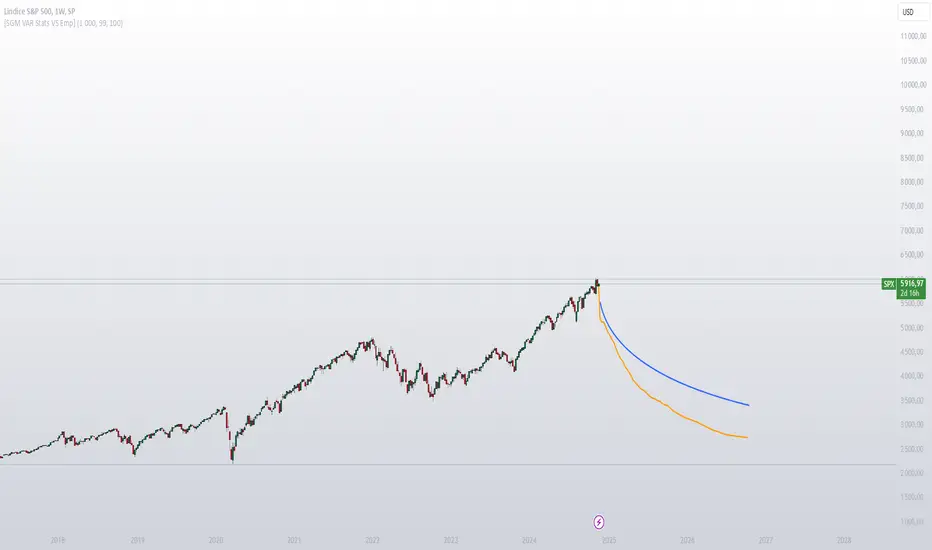
[SGM VaR Stats VS Empirical]Main Functions
Logarithmic Returns & Historical Data
Calculates logarithmic returns from closing prices.
Stores these returns in a dynamic array with a configurable maximum size.
Approximation of the Inverse Error Function
Uses an approximation of the erfinv function to calculate z-scores for given confidence levels.
Basic Statistics
Mean: Calculates the average of the data in the array.
Standard Deviation: Measures the dispersion of returns.
Median: Provides a more robust measure of central tendency for skewed distributions.
Z-Score: Converts a confidence level into a standard deviation multiplier.
Empirical vs. Statistical Projection
Empirical Projection
Based on the median of cumulative returns for each projected period.
Applies an adjustable confidence filter to exclude extreme values.
Statistical Projection
Relies on the mean and standard deviation of historical returns.
Incorporates a standard deviation multiplier for confidence-adjusted projections.
PolyLines (Graphs)
Generates projections visually through polylines:
Statistical Polyline (Blue): Based on traditional statistical methods.
Empirical Polyline (Orange): Derived from empirical data analysis.
Projection Customization
Maximum Data Size: Configurable limit for the historical data array (max_array_size).
Confidence Level: Adjustable by the user (conf_lvl), affects the width of the confidence bands.
Projection Length: Configurable number of projected periods (length_projection).
Key Steps
Capture logarithmic returns and update the historical data array.
Calculate basic statistics (mean, median, standard deviation).
Perform projections:
Empirical: Based on the median of cumulative returns.
Statistical: Based on the mean and standard deviation.
Visualization:
Compare statistical and empirical projections using polylines.
Utility
This script allows users to compare:
Traditional Statistical Projections: Based on mathematical properties of historical returns.
Empirical Projections: Relying on direct historical observations.
Divergence or convergence of these lines also highlights the presence of skewness or kurtosis in the return distribution.
Ideal for traders and financial analysts looking to assess an asset’s potential future performance using combined statistical and empirical approaches.
SPX Open vs SMA AlertThis indicator is specifically designed to identify the first market-relevant candle of the S&P 500 (SPX) after the market opens. The opening price of the trading day is compared to a customizable simple moving average (SMA) period. A visual marker and an alert are triggered when the opening price is above the SMA. Perfect for traders seeking early market trends or integrating automated trading strategies.
Features:
Market Open: The indicator uses the New York market open time (09:30 ET), accounting for time zones and daylight saving time changes.
Flexible Time Offset: Users can set a time offset to trigger alerts after the market opens.
Customizable SMA: The SMA period is adjustable, with a default value of 10.
Visual Representation: A step-line SMA is plotted directly on the chart with subtle transparency and clean markers.
Alert Functionality: Alerts are triggered when conditions are met (opening price > SMA).
Usage:
This indicator is ideal for identifying relevant trading signals early in the session.
Alerts can also serve as triggers for automated trading, e.g., in conjunction with the Trading Automation Toolbox.
Supports both intraday and daily charts.
Alarm Settings:
Select the appropriate symbol (e.g., SPX) and the alert condition "SPX Open > SMA10".
Trigger Settings:
Choose "Once Per Bar Close" to ensure the condition is evaluated at the end of each candle.
If you prefer to evaluate the condition immediately when it becomes true, choose "Once Per Minute".
Duration:
Set the alarm to "Open-ended" if you want it to remain active indefinitely.
Alternatively, set a specific expiration date for the alarm.

Weekly COTAdjusted COT Index
Improves upon: "COT Index Commercials vs large and small Speculators" by SystematicFutures
How: CoT Indexes are adjusted by Open Interest to normalise data over time, and threshold background colours are in-line with Larry Williams recommendations from his book.
Note: This indicator is **only** accurate on the Daily time-frame due to the mid-week release date for CoT data.
This script calculates and plots the Adjusted Commitment of Traders (COT) Index for Commercial, Large Speculator, and Retail (Small Speculator) categories.
The CoT Index is adjusted by Open Interest to normalise data through time, following the methodology of Larry Williams, providing insights into how these groups are positioned in the market with an arguably more historically accurate context.
COT Categories
-------------------
- Commercials (Producers/Hedgers): Large entities hedging against price changes in the underlying asset.
- Large Speculators (Non-commercials): Professional traders and funds speculating on price movements.
- Retail Traders (Nonreportable/Small Speculators): Small individual traders, typically less informed.
Features
----------
- Open Interest Adjustment
- The net positions for each category are normalized by Open Interest to account
for varying contract sizes.
- Customisable Look-back Period
- You can adjust the number of weeks for the index calculation to control the
historical range used for comparison.
- Thresholds for Extremes
- Upper and lower thresholds (configurable) are provided to mark overbought and
oversold conditions.
- Defaults
- Overbought: <=20
- Oversold: >= 80
- Hide Current Week Option
- Optionally hide the current week's data until market close for more accurate comparison.
- Visual Aids
- Plot the Commercials, Large Speculators, and Retail indexes, and optionally highlight extreme positioning.
Inputs
--------
- weeks
- Number of weeks for historical range comparison.
- upperExtreme and lowerExtreme
- Thresholds to identify overbought/oversold conditions (default 80/20).
- hideCurrentWeek
- Option to hide current week's data until market close.
- markExtremes
- Highlight extremes where any index crosses the upper or lower thresholds.
- Options to display or hide indexes for Commercials, Large Speculators, and Small Speculators.
Outputs
----------
- The script plots the COT Index for each of the three categories and highlights periods of extreme positioning with customisable thresholds.
Usage
-------
- This tool is useful for traders who want to track the positioning of different market participants over time.
- By identifying the extreme positions of Commercials, Large Speculators, and Retail traders, it can give insights into market sentiment and potential reversals.
- Reversals of trend can be confirmed with RSI Divergence (daily), for example
- Continuation can be confirmed with RSI overbought/oversold conditions (daily), and/or hidden RSI Hidden Divergence, for example

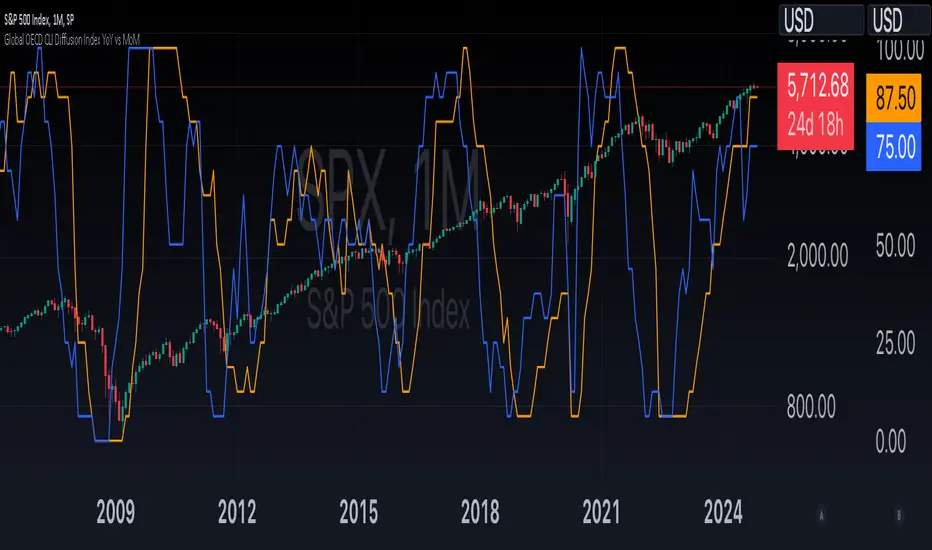
Global OECD CLI Diffusion Index YoY vs MoMThe Global OECD Composite Leading Indicators (CLI) Diffusion Index is used to gauge the health and directional momentum of the global economy and anticipate changes in economic conditions. It usually leads turning points in the economy by 6 - 9 months.
How to read: Above 50% signals economic expansion across the included countries. Below 50% signals economic contraction.
The diffusion index component specifically shows the proportion of countries with positive economic growth signals compared to those with negative or neutral signals.
The OECD CLI aggregates data from several leading economic indicators including order books, building permits, and consumer and business sentiment. It tracks the economic momentum and turning points in the business cycle across 38 OECD member countries and several other Non-OECD member countries.
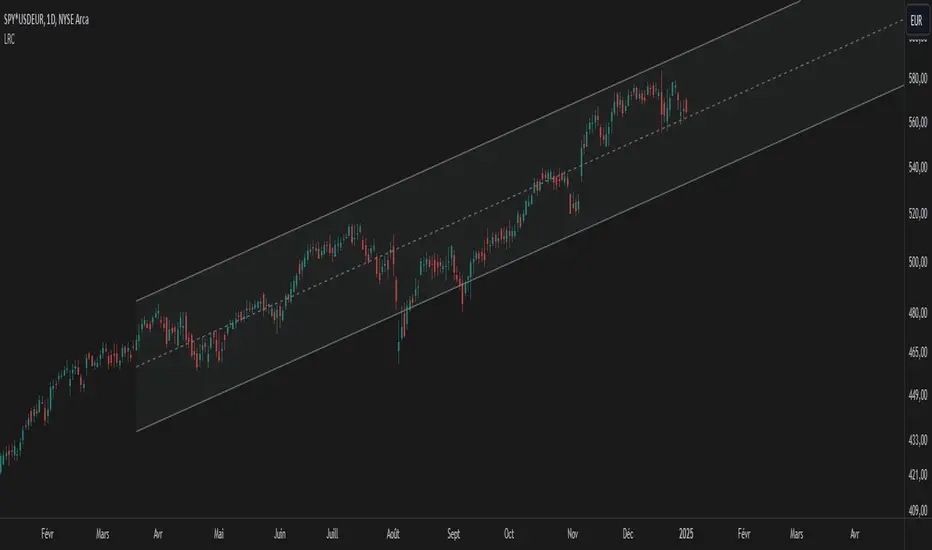
Linear Regression Channel UltimateKey Features and Benefits
Logarithmic scale option for improved analysis of long-term trends and volatile markets
Activity-based profiling using either touch count or volume data
Customizable channel width and number of profile fills
Adjustable number of most active levels displayed
Highly configurable visual settings for optimal chart readability
Why Logarithmic Scale Matters
The logarithmic scale option is a game-changer for analyzing assets with exponential growth or high volatility. Unlike linear scales, log scales represent percentage changes consistently across the price range. This allows for:
Better visualization of long-term trends
More accurate comparison of price movements across different price levels
Improved analysis of volatile assets or markets experiencing rapid growth
How It Works
The indicator calculates a linear regression line based on the specified period
Upper and lower channel lines are drawn at a customizable distance from the regression line
The space between the channel lines is divided into a user-defined number of levels
For each level, the indicator tracks either:
- The number of times price touches the level (touch count method)
- The total volume traded when price is at the level (volume method)
The most active levels are highlighted based on this activity data
Understanding Touch Count vs Volume
Touch count method: Useful for identifying key support/resistance levels based on price action alone
Volume method: Provides insight into levels where the most trading activity occurs, potentially indicating stronger support/resistance
Practical Applications
Trend identification and strength assessment
Support and resistance level discovery
Entry and exit point optimization
Volume profile analysis for improved market structure understanding
This Linear Regression Channel indicator combines powerful statistical analysis with flexible visualization options, making it an invaluable tool for traders and analysts across various timeframes and markets. Its unique features, especially the logarithmic scale and activity profiling, provide deeper insights into market behavior and potential turning points.
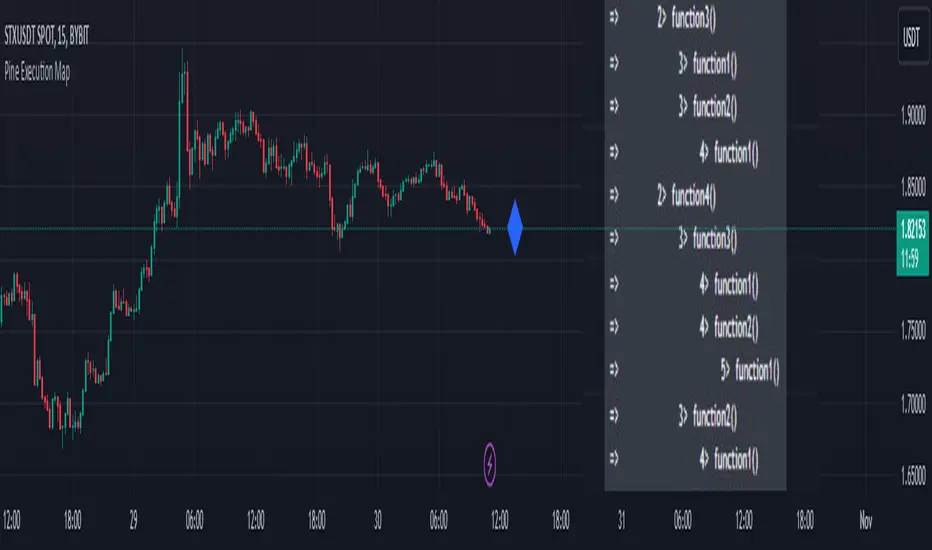
Pine Execution MapPine Script Execution Map
Overview:
This is an educational script for Pine Script developers. The script includes data structure, functions/methods, and process to capture and print Pine Script execution map of functions called while pine script execution.
Map of execution is produced for last/latest candle execution.
The script also has example code to call execution map methods and generate Pine Execution map.
Use cases:
Pine script developers can get view of how the functions are called
This can also be used while debugging the code and know which functions are called vs what developer expect code to do
One can use this while using any of the open source published script and understand how public script is organized and how functions of the script are called.
Code components:
User defined type
type EMAP
string group
string sub_group
int level
array emap = array.new()
method called internally by other methods to generate level of function being executed
method id(string tag) =>
if(str.startswith(tag, "MAIN"))
exe_level.set(0, 0)
else if(str.startswith(tag, "END"))
exe_level.set(0, exe_level.get(0) - 1)
else
exe_level.set(0, exe_level.get(0) + 1)
exe_level.get(0)
Method called from main/global scope to record execution of main scope code. There should be only one call to this method at the start of global scope.
method main(string tag) =>
this = EMAP.new()
this.group := "MAIN"
this.sub_group := tag
this.level := "MAIN".id()
emap.push(this)
Method called from main/global scope to record end of execution of main scope code. There should be only one call to this method at the end of global scope.
method end_main(string tag) =>
this = EMAP.new()
this.group := "END_MAIN"
this.sub_group := tag
this.level := 0
emap.push(this)
Method called from start of each function to record execution of function code
method call(string tag) =>
this = EMAP.new()
this.group := "SUB"
this.sub_group := tag
this.level := "SUB".id()
emap.push(this)
Method called from end of each function to record end of execution of function code
method end_call(string tag) =>
this = EMAP.new()
this.group := "END_SUB"
this.sub_group := tag
this.level := "END_SUB".id()
emap.push(this)
Pine code which generates execution map and show it as a label tooltip.
if(barstate.islast)
for rec in emap
if(not str.startswith(rec.group, "END"))
lvl_tab = str.repeat("", rec.level+1, "\t")
txt = str.format("=> {0} {1}> {2}", lvl_tab, rec.level, rec.sub_group)
debug.log(txt)
debug.lastr()
Snapshot 1:
This is the output of the script and can be viewed by hovering mouse pointer over the blue color diamond shaped label
Snapshot 2:
How to read the Pine execution map
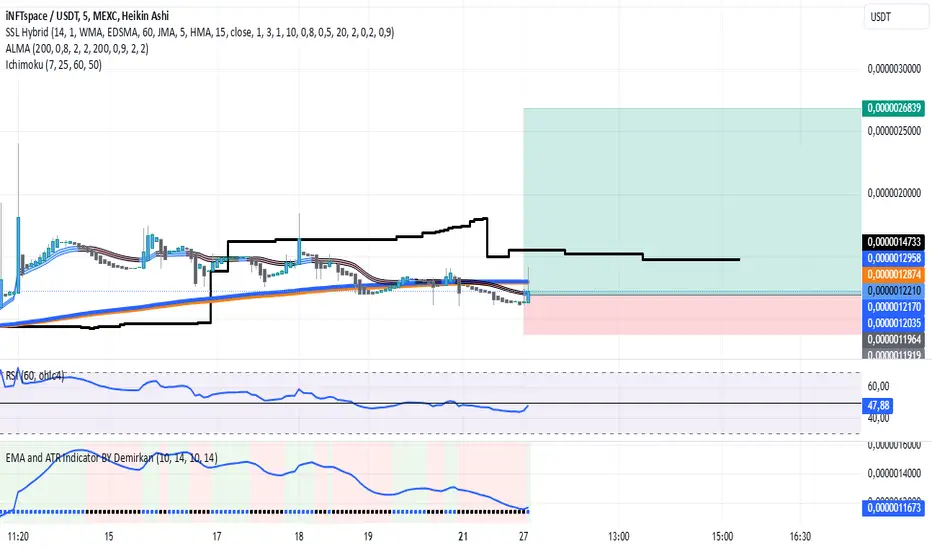
EMA and ATR Indicator BY DemirkanEMA 10 and ATR Indicator BY Demirkan
The EMA 10 and ATR Indicator combines two powerful technical indicators used to analyze trends and identify potential trading opportunities.
Indicator Components:
Exponential Moving Average (EMA):
EMA 10: Calculates the weighted average of the last 10 closing prices. This indicator is effective in tracking short-term price movements. When the price is above the EMA, it is considered that the trend is upward; when it is below, it is assessed as a downward trend.
Average True Range (ATR):
ATR: A measure of market volatility. When the ATR value falls within a specified range (between 10 and 14 in this indicator), the price movement is considered significant. This helps you base your trading decisions on more solid grounds.
Usage Recommendations:
Buy Signal: When the price is above the EMA and the ATR is within the specified range, this can be interpreted as a potential buy signal.
Sell Signal: When the price is below the EMA, this can be interpreted as a potential sell signal.
Chart Displays:
EMA Line: Displayed as a blue line, allowing you to see how the EMA relates to current price levels.
Price Status: Circles are used to indicate whether the price is above or below the EMA. A green circle indicates the price is above the EMA, while a red circle indicates it is below.
Background Colors: The chart background changes to green or red to highlight buy and sell conditions.
Aesthetic Presentation:
Using the "Flag" and "Below" parameters for the Price vs EMA indicator provides an aesthetically pleasing appearance on the chart. This type of visual presentation helps users quickly and easily grasp trading signals. Additionally, this aesthetic touch makes investors' charts look more professional and appealing.
This indicator is a useful tool for traders looking to develop short-term trading strategies. However, it should always be used in conjunction with additional analysis and other indicators.
Note: This indicator is for educational purposes only and should not be taken as investment advice.
30D Vs 90D Historical VolatilityVolatility equals risk for an underlying asset's price meaning bullish volatility is bearish for prices while bearish volatility is bullish. This compares 30-Day Historical Volatility to 90-Day Historical Volatility.
When the 30-Day crosses under the 90-day, this is typically when asset prices enter a bullish trend.
Conversely, When the 30-Day crosses above the 90-Day, this is when asset prices enter a bearish trend.
Peaks in volatility are bullish divergences while troughs are bearish divergences.

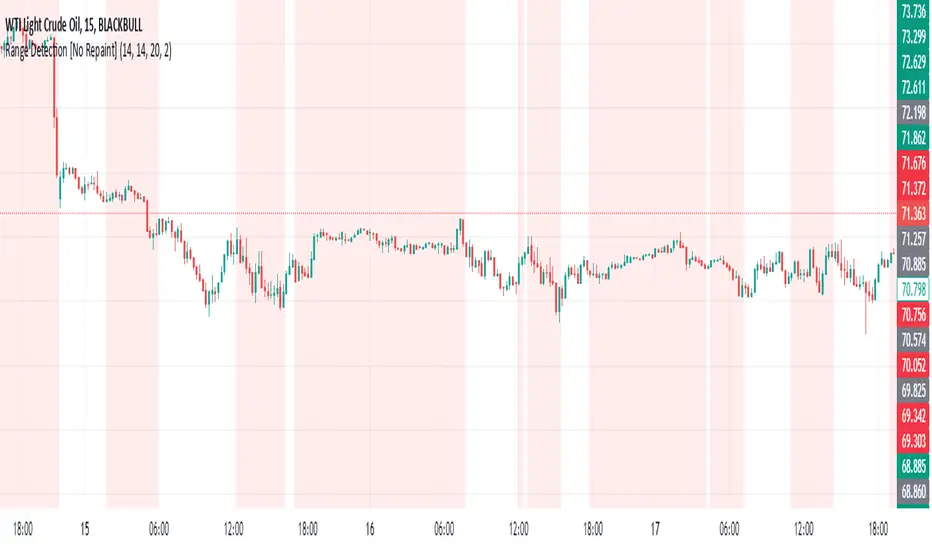
Range Detection [No Repaint]DETECTS RANGE EARLY
Using Confirmed Data:
All calculations now use to reference the previous completed candle
Signals are only generated based on completed candles
Range state is stored and confirmed before displaying
Key Changes to Prevent Repainting:
ATR calculations use previous candle data
Bollinger Bands calculate from previous closes
Price range checks use previous highs and lows
Range state is confirmed before displaying
How to Verify No Repainting:
Signals will only appear after a candle closes
Historical signals will remain unchanged
Alerts will only trigger on confirmed changes
This means:
The indicator will be slightly delayed (one candle)
But signals will be more reliable
Historical analysis will be accurate
Backtesting results will match real-time performance
Usage Tips with No-Repaint Version:
Wait for candle close before acting on signals
Use the confirmed range state for decision making
Consider the one-candle delay in your strategy timing
Alerts will only trigger on confirmed condition changes
Would you like me to:
Add a parameter to choose between real-time and no-repaint modes?
Add visual indicators for pending vs confirmed signals?
Modify the sensitivity of the range detection?
Daily Volume Metrics BoxDaily Volume Metrics Box
A powerful tool for monitoring intraday trading metrics in real-time. This indicator provides a clean, customizable display of key market statistics that reset daily.
🔑 Key Features:
- Daily Volume Distribution - Track positive and negative volume separately
- Net Volume Analysis - Monitor the balance of buying vs selling volume
- Average Candle Size - Dynamic calculation of recent price movement magnitude
- Flexible Positioning - Place the metrics box in any corner of your chart
- Auto-Reset - All metrics automatically reset at the start of each trading day
- Current Date Display - Always know which day's data you're viewing
📊 Metrics Explained:
1. Avg Size: Average candle size over your specified lookback period
2. Pos Vol: Accumulated volume from up-moves during the current day
3. Neg Vol: Accumulated volume from down-moves during the current day
4. Net Vol: The difference between positive and negative volume (Pos Vol - Neg Vol)
⚙️ Customization Options:
- Number of candles for average (1-∞)
- Background color and transparency
- Text color
- Box position (Top/Bottom, Left/Right)
- Distance from chart edge (1-5 bars)
📌 Usage Tips:
- Use larger lookback periods for more stable average candle size
- Position the box where it won't interfere with your chart analysis
- Monitor net volume for potential trend strength confirmation
- Compare positive and negative volume for insight into price momentum
🔄 Daily Reset:
All volume metrics reset at the start of each trading day, ensuring you're always looking at current day data only.
Perfect for day traders, swing traders, and anyone who wants to monitor intraday market dynamics with clean, organized metrics.
Note: This indicator works best on intraday timeframes where volume data is available.

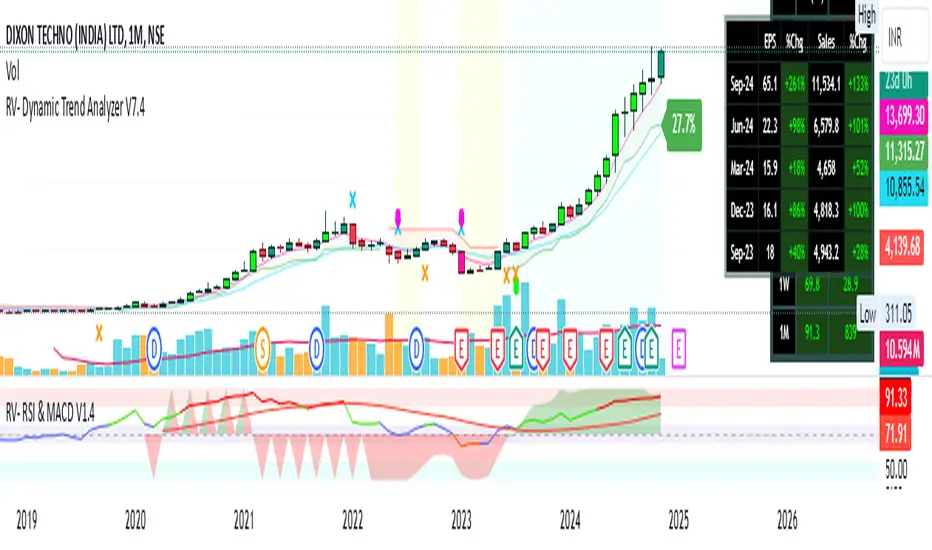
RV- Dynamic Trend AnalyzerRV Dynamic Trend Analyzer
The RV Dynamic Trend Analyzer is a powerful TradingView indicator designed to help traders identify and capitalize on trends across multiple time frames—daily, weekly, and monthly. With dynamic adjustments to key technical indicators like EMA and MACD, the tool adapts to different chart periods, ensuring more accurate signals. Whether you are swing trading or holding longer-term positions, this indicator provides reliable buy/sell signals, breakout opportunities, and customizable visual elements to enhance decision-making. Its intelligent use of EMAs and MACD values ensures high potential returns, making it suitable for traders seeking strong, data-driven strategies. Below are its core features and their respective benefits.
Supertrend Indicator:
Importance: The Supertrend is a trend-following tool that helps traders identify the market’s direction by offering clear buy and sell signals based on price movement relative to the Supertrend line.
Benefits:
Helps filter out market noise and enables traders to stay in trends longer.
The pullback detection feature enhances trade timing by identifying potential entry points during retracements.
ATH/ATL & 52-Week High/Low with Candle Coloring:
Importance: Tracking all-time highs (ATH), all-time lows (ATL), and 52-week high/low levels helps traders identify key support and resistance levels.
Benefits:
Offers insights into the strength of price movements and potential reversal zones.
Candle coloring improves visual analysis, allowing quick identification of bullish or bearish conditions at critical levels.
Multi-Time Frame Analysis
Importance: The ability to view indicators like RSI and MACD across multiple time frames provides a more in-depth and comprehensive view of market behavior, allowing traders to make informed decisions that align with both short-term and long-term trends.
Benefits:
Align Strategies Across Time frames: By using multiple time frames, traders can align their strategies with larger trends (such as weekly or daily) while executing trades on lower time frames (like 1-minute or 5-minute charts). This improves the accuracy of trade entries and exits.
Reduce False Signals: Viewing key technical indicators like RSI and MACD across different time frames reduces the likelihood of false signals by offering a broader market context, filtering out noise from smaller time frames.
Customization of Table Display: Traders can customize the position and size of a table that displays RSI and MACD values for selected time frames. This flexibility enhances visibility and ease of analysis.
Time frame-Specific Data: The code allows for displaying RSI and MACD data for up to seven different time frames, making it highly customizable for traders depending on their preferred analysis period.
Visual Clarity: The table displays key values such as RSI and MACD histogram readings in a visually clear format, with color coding to quickly indicate overbought/oversold levels or MACD crossovers.
Pivot Points:
Importance: Pivot points serve as key support and resistance levels that help predict potential price movements.
Benefits:
Assists in identifying potential reversal zones and breakout points, aiding in trade planning.
Displaying pivot points across multiple time frames enhances market insight and improves strategic planning.
Quarterly Earnings Table:
Importance: Understanding a company’s quarterly earnings releases is crucial, as these events often lead to significant price volatility. Traders can leverage this information to adjust their strategies around earnings reports and prevent unexpected losses.
Benefits:
Helps traders anticipate potential price movements due to earnings reports.
Allows traders to avoid sudden losses by being aware of important earnings announcements and adjusting positions accordingly.
Customizable Visuals for Traders:
Dark Mode: Toggle between dark and light themes based on your chart's color scheme.
Mini Mode: A condensed version that visually simplifies the data, making it quicker to interpret through color-coded traffic lights (green for positive, red for negative).
Table Size & Position: Customize the size and position of the table for better visibility on your charts.
Data Period (FQ vs FY): Easily switch between displaying quarterly or yearly data based on the selected period.
Top-Left Cell Display: Option to display Free Float or Market Cap in the top-left cell for quick reference.
Exponential Moving Averages (EMAs) with Adjustable Lengths:
Importance: EMAs are essential for identifying trends and generating reliable buy/sell signals. The indicator plots four EMAs that dynamically adjust based on the selected time frame.
Benefits:
Dynamic Time frame Logic: EMA lengths and sources automatically adapt based on whether the user selects daily, weekly, or monthly time frames. This ensures the EMAs are relevant for the chosen strategy.
Multiple EMAs: By incorporating four different EMAs, users can observe both short-term and long-term trends simultaneously, improving their ability to identify key trend shifts.
Breakout Arrow Functionality:
Importance: This feature visually signals potential buy/sell opportunities based on the interaction between EMAs and MACD crossovers.
Benefits:
Crossover Signals: Arrows are plotted when EMAs and MACD cross, indicating breakout opportunities and aiding in quick trade decisions.
RSI Filter Option: Users can apply an optional RSI filter to refine buy/sell signals, reducing false signals and improving overall accuracy.
Disclaimer:
Before engaging in actual trading, we strongly recommend back testing the this indicator to ensure it fits your trading style and risk tolerance. Be sure to adjust your risk-reward ratio and set appropriate stop-loss levels to safeguard your investments. Proper risk management is key to successful trading.
Adjusted CoT IndexAdjusted COT Index
Improves upon: "COT Index Commercials vs large and small Speculators" by SystematicFutures
How: CoT Indexes are adjusted by Open Interest to normalise data over time, and threshold background colours are in-line with Larry Williams recommendations from his book.
Note: This indicator is **only** accurate on the Daily time-frame due to the mid-week release date for CoT data.
This script calculates and plots the Adjusted Commitment of Traders (COT) Index for Commercial, Large Speculator, and Retail (Small Speculator) categories.
The CoT Index is adjusted by Open Interest to normalise data through time, following the methodology of Larry Williams, providing insights into how these groups are positioned in the market with an arguably more historically accurate context.
COT Categories
-------------------
- Commercials (Producers/Hedgers): Large entities hedging against price changes in the underlying asset.
- Large Speculators (Non-commercials): Professional traders and funds speculating on price movements.
- Retail Traders (Nonreportable/Small Speculators): Small individual traders, typically less informed.
Features
----------
- Open Interest Adjustment
- The net positions for each category are normalized by Open Interest to account
for varying contract sizes.
- Customisable Look-back Period
- You can adjust the number of weeks for the index calculation to control the
historical range used for comparison.
- Thresholds for Extremes
- Upper and lower thresholds (configurable) are provided to mark overbought and
oversold conditions.
- Defaults
- Overbought: <=20
- Oversold: >= 80
- Hide Current Week Option
- Optionally hide the current week's data until market close for more accurate comparison.
- Visual Aids
- Plot the Commercials, Large Speculators, and Retail indexes, and optionally highlight extreme positioning.
Inputs
--------
- weeks
- Number of weeks for historical range comparison.
- upperExtreme and lowerExtreme
- Thresholds to identify overbought/oversold conditions (default 80/20).
- hideCurrentWeek
- Option to hide current week's data until market close.
- markExtremes
- Highlight extremes where any index crosses the upper or lower thresholds.
- Options to display or hide indexes for Commercials, Large Speculators, and Small Speculators.
Outputs
----------
- The script plots the COT Index for each of the three categories and highlights periods of extreme positioning with customisable thresholds.
Usage
-------
- This tool is useful for traders who want to track the positioning of different market participants over time.
- By identifying the extreme positions of Commercials, Large Speculators, and Retail traders, it can give insights into market sentiment and potential reversals.
- Reversals of trend can be confirmed with RSI Divergence (daily), for example
- Continuation can be confirmed with RSI overbought/oversold conditions (daily), and/or hidden RSI Hidden Divergence, for example

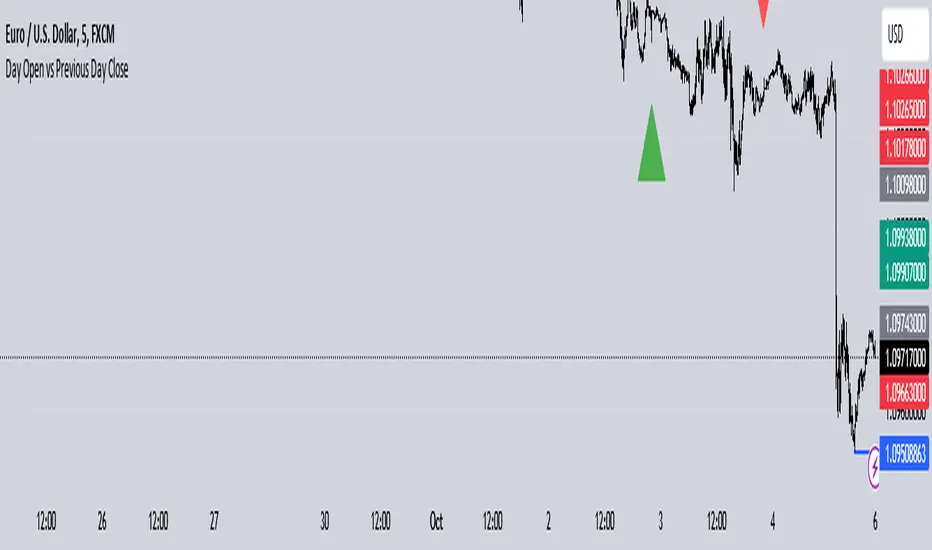
Day Open vs Previous Day CloseThe concept of comparing the **Day Open** to the **Previous Day Close** is used frequently in technical analysis to gauge the sentiment or momentum at the start of a new trading day.
### Key Terms:
- **Day Open**: The first traded price of an asset when the market opens for the day.
- **Previous Day Close**: The last traded price of an asset when the market closed on the previous day.
### Importance of Day Open vs. Previous Day Close
1. **Market Sentiment Indicator**:
- If the **Day Open** is **higher** than the **Previous Day Close**, it suggests **bullish** sentiment (buyers are willing to pay more than yesterday's closing price).
- If the **Day Open** is **lower** than the **Previous Day Close**, it suggests **bearish** sentiment (sellers are driving prices down compared to the last price from the previous day).
2. **Potential Gaps**:
- A **gap** occurs when there is a significant difference between the Day Open and Previous Day Close, often due to events or news released after the market closed. This gap can indicate strong momentum in either direction.
- **Gap Up**: Open > Close (bullish).
- **Gap Down**: Open < Close (bearish).
3. **Trend Continuation or Reversal**:
- If the market opens above the previous day’s close and continues to rise, it often signals a **continuation of an upward trend**.
- Conversely, if the market opens below and keeps falling, it suggests **downward momentum** is still strong.
4. **Trading Strategies**:
- **Opening Range Breakout**: Traders may look for the price to break above or below the opening range (the price range between the Day Open and the first few candles) to confirm a strong bullish or bearish move.
- **Reversals**: Some traders look for price reversals if the price spikes far above or below the previous day's close, expecting that the market might correct itself and return towards the previous day’s closing levels.
In the context of your **Opening Range Indicator**, the concept of the Day Open sweeping and closing above or below the Previous Day Close is used to identify whether the new day is setting up for a **buy (bullish)** or **sell (bearish)** opportunity.
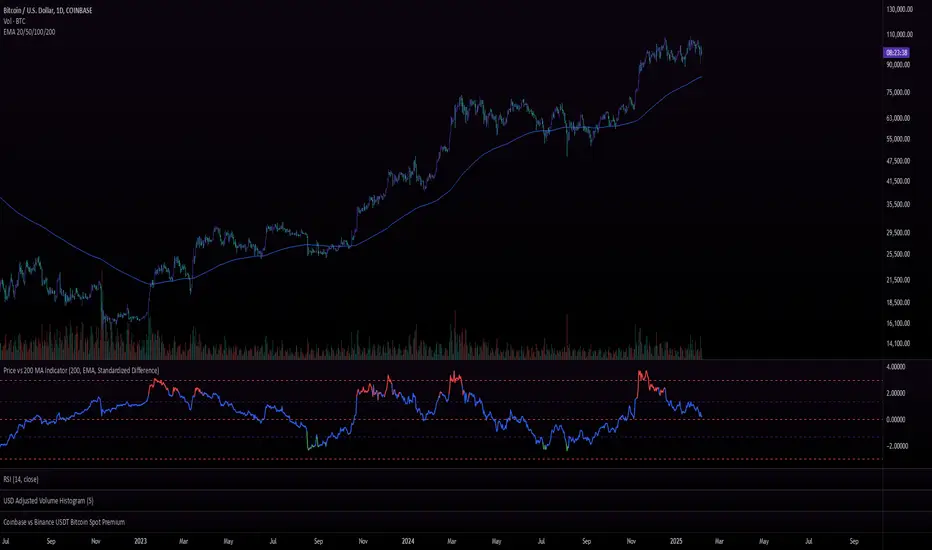
Price vs 200 EMA IndicatorPurpose :
The Price vs. 200 MA (EMA) Indicator measures the deviation of the current price from its 200-period Exponential Moving Average (EMA). Instead of merely plotting the raw difference, the indicator calculates a standardized difference (similar to a z-score), which quantifies the deviation in terms of standard deviations over time. This helps traders understand how extreme the price is relative to its long-term average and its typical volatility.
Use Cases :
Trend Analysis:
Traders can use the standardized difference to assess how extreme the current price is relative to its long-term trend (200 EMA) while normalizing for volatility.
When the z-score approaches extreme levels (e.g., above 2 or below -2), it may indicate that the asset is overextended in either direction.
Mean Reversion Strategy:
Since the indicator identifies when the price deviates far from the 200 EMA (in terms of standard deviations), traders can use it to time mean-reversion trades, buying when the price is below -2 (oversold) and selling when it’s above +2 (overbought).
Trend Continuation or Exhaustion:
If the price continues to stay above +2 for extended periods, it could indicate a strong trend, whereas a reversion toward the EMA after reaching +2 or -2 could signal trend exhaustion or reversal.
Summary :
The Price vs. 200 MA (EMA) Indicator calculates the standardized difference (z-score) between the price and its 200-period EMA, giving traders a normalized measure of how far the price is from its long-term average, relative to typical price volatility. The color-coded plot provides a clear visual representation of potential overbought/oversold conditions and highlights when the price has deviated significantly from the 200 EMA in either direction.